What is an impression tracking URL?
An impression tracking URL, or impression tag, is a link from a measurement vendor that the ad platform calls each time your ad is shown. On Snapchat it goes in the ad's Impression Tracker field. On TikTok it is the Impression tracking URL in the ad's tracking settings. It counts views in the vendor's tool, not clicks or leads.
When the ad is shown, the impression tag fires to your vendor. When it's clicked, the tagged landing URL passes the source to the form, which keeps it on the lead and the deal.
This guide is by Dessy, Trakt's Snapchat guide, with the TikTok section by Silvia, Trakt's TikTok guide.
Impression tags exist for verification and reach: an outside vendor, such as an ad server or a verification company, counts the impression independently of the platform's own report. They do not carry a lead source. The click still needs UTMs.
How do you add an impression tag in Snapchat Ads Manager?
Snap's help article Implementing Third Party Tracking Tags documents the manual path:
- Get the tag from your measurement vendor. Snap lists Google DoubleClick (Campaign Manager), Integral Ad Science and Nielsen mDAR for manual tagging.
- Open the ad while creating the campaign, or edit an existing ad.
- Under Delivery, paste the tracking URL into the Impression Tracker field. Use Click Tracker for a click tag.
- Choose Add Another for additional tags, then Save.
DoubleVerify works differently. Snap describes it as a tagless integration: you tick DoubleVerify under Third Party Tracking at the ad set level instead of pasting a URL.
Rules from Snap's tag types and vendor notes pages:
- The Impression Tracker field takes a 1x1 tag that fires when the ad renders. Snap accepts impression trackers from approved vendors only.
- iFrame, JavaScript, internal redirect and VAST DCM tags are not accepted. Strip the
IMG SRCURL out of the vendor's tag. - For DoubleClick impression tags, replace DoubleClick's timestamp with Snap's cachebuster
~.~TIMESTAMP~.~. - Snap supports macros such as
~.~SERVER_CAMPAIGN_ID~.~and~.~SERVER_AD_ID~.~in impression and click tags, per its third-party tracking FAQs.
A badly formatted tag returns error E2711, "The tracking URL is invalid," according to Snap's Ads Manager errors page.
How do you add an impression tracking URL on TikTok?
TikTok Ads Manager has an Impression tracking URL and a Click tracking URL among each ad's settings. Paste the URL your measurement vendor generates into the impression field when you create or edit the ad. In TikTok's Marketing API, the same fields are impressionTrackingUrls and clickTrackingUrls, which TikTok's Business API SDK docs describe as URLs generated by your data partner.
For app campaigns, a mobile measurement partner's click and impression URLs are added to the app in TikTok's app event settings rather than ad by ad. Check your partner's TikTok guide for the exact path.
Ask your vendor which tag format TikTok accepts, and test that the impression count in the vendor's tool moves once the ad starts serving.
Why impressions do not reach your CRM
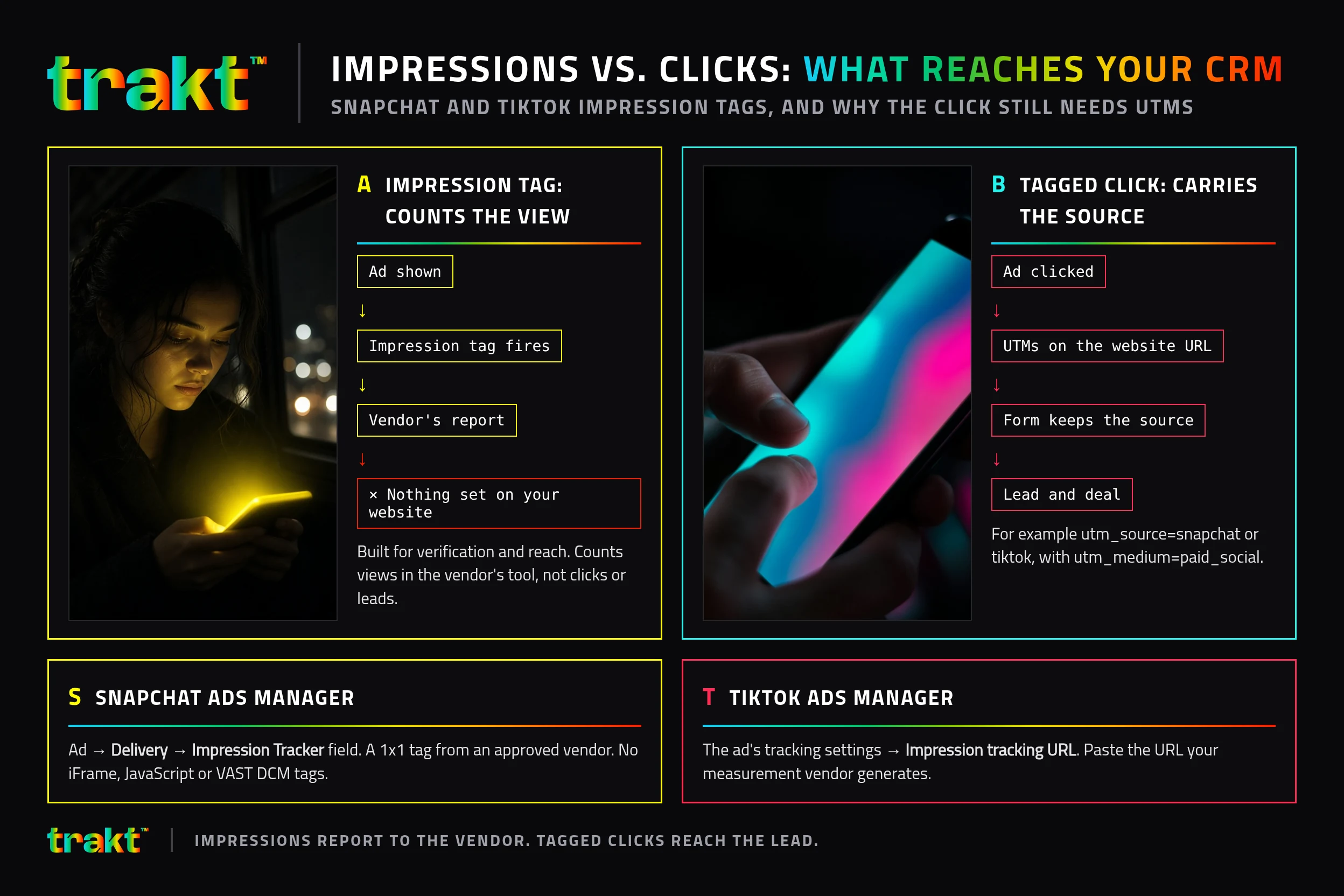
An impression tag reports to the vendor that issued it. It does not set anything on your website, so a person who saw the ad and later visits your site arrives with no record of the view. View-through numbers in the platform are the platform's own model.
What reaches a lead is the click:
- Put UTMs on the ad's website URL, for example
utm_source=snapchatorutm_source=tiktok,utm_medium=paid_social, a campaign and a content value for the creative. Snapchat UTM parameters and TikTok UTM parameters have the templates. - Keep the platform click tracker, if you use one, as a redirect that preserves the query string. Click the ad preview and read the final URL.
- Make sure the form stores the UTMs with the submission.
If you want the click side tagged the same way across Snapchat and TikTok, and every form lead recorded with that source, pre-register for Trakt.
| What you want to know | Use | Where it shows up |
|---|---|---|
| Was the ad shown, and was it viewable? | Impression tag from a verification vendor | The vendor's report |
| How many people clicked? | Platform reporting or a click tracker | Ads Manager or the vendor |
| Which ad produced the lead? | UTMs on the website URL, kept by the form | The lead record |
| Which ad produced revenue? | Same UTMs, carried onto the deal | Closed deals by source |
Trakt records each form submission with its source attached, even when the form has no hidden fields, and keeps the UTMs in a first-party cookie for 90 days. Won deal value is credited to the source captured at submission, in Trakt's leads pipeline.
Frequently asked questions
What is an impression tag on Snapchat?
An impression tag on Snapchat is a 1x1 tracking URL from an approved measurement vendor that fires when your ad renders. You paste it into the Impression Tracker field under Delivery on the ad in Ads Manager. Snap accepts standard tags and rejects iFrame and JavaScript tags.
Where is the impression tracking URL in TikTok Ads Manager?
It is one of the ad's settings, alongside the Click tracking URL. Add it when you create or edit the ad. For app campaigns, the measurement partner's impression URL is set on the app in TikTok's app event settings.
Does an impression tracking URL track conversions?
No. It counts ad impressions in the vendor's tool. Conversions and leads come from a tagged click reaching your site, or from the platform's own pixel and its attribution model.
Which vendors does Snapchat accept impression trackers from?
Snap's help lists Google DoubleClick, Integral Ad Science and Nielsen mDAR for manual tags, and DoubleVerify through a tagless integration at the ad set level. Snap says it only accepts impression trackers from approved vendors, so check its current list.
What does the ~.~TIMESTAMP~.~ macro do on Snapchat?
It is Snap's cachebuster. Snap replaces it with a timestamp each time the tag fires, so browsers and servers do not cache the request and every impression is counted. For DoubleClick tags, Snap says to remove DoubleClick's own timestamp and add this macro.
Can impression tracking show which ad produced a lead?
Not on its own. The impression tag reports to a vendor and sets nothing on your site. To see which ad produced a lead, put UTMs on the ad's website URL and make sure your form stores them with the submission.