

Snapchat UTM parameters are the campaign tags on the website URL attached to an ad. They tell your analytics and your CRM which Snapchat campaign and which ad sent the click.
UTM is the old Urchin tracking module name. The parameters that matter are utm_source, utm_medium, utm_campaign, utm_content, and utm_term. Snap does not invent a different set. It lets you append those tags, and it can fill some of the values with macros when the ad is served.
Put the tags in Ads Manager's URL builder → confirm them on the preview link → keep them on the form and the deal.
The Snapchat marketing strategy is why you bother. Snapchat campaign tracking is the path after the click. This page is the parameter list, checked against Snap's help center on 2026-10-21.
What are Snapchat UTM parameters?
Snapchat UTM parameters are the utm_source, utm_medium, utm_campaign and utm_content tags on a Snapchat ad's website URL. Ads Manager can fill the campaign and ad values with macros or auto-UTMs, so each visit and form submission shows which Snapchat ad sent it. Tools like Trakt record each form submission with its UTMs.
Quick start: Start free with Trakt to build consistent Snapchat UTM links and record each form submission with the ad it came from. Or follow the manual steps below.
A destination with no tags:
https://example.com/demo
The same page with tags:
https://example.com/demo?utm_source=snapchat&utm_medium=paid&utm_campaign=spring-demo&utm_content=video-hook-v2
example.com is a placeholder. The tags answer where the click came from, whether it was paid, which offer it belonged to, and which creative it was. When the form stores them, the lead is no longer just "Website".
They work on any Snapchat placement that opens a URL you control: a Story ad website button, a single image or video ad, a Collection ad, a Commercial, and an AR ad. Snap's Add URL Macros to Your Ads lists those formats for a website or deep link attachment. A profile link you edit yourself can carry the same tags, typed by hand, because it is not an ad. Tracking Snapchat AI lenses is the AR case. Snapchat Story ads is the Story attachment.
Snap's About URL Parameters and Macros is explicit that a website analytics tool is still required. The parameters do not report on their own, and the Snap Pixel does not replace them.
Snapchat URL parameter and macro table
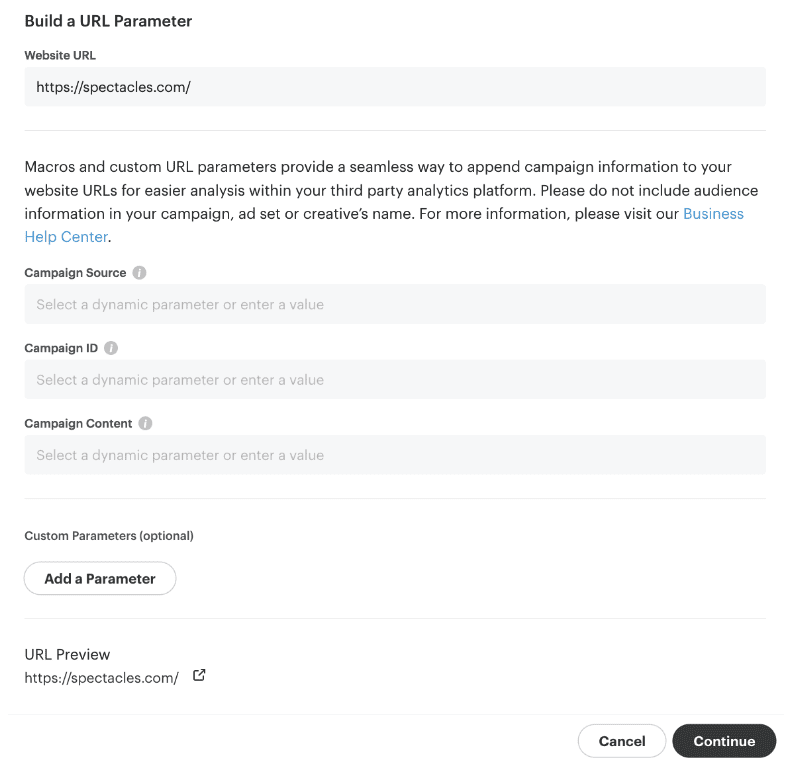
In Ads Manager, at the ad, choose Build a URL parameter. Snap offers three default keys. If you leave a default key empty, Snap does not append it. A custom key you add must not be empty. Both rules are in the macro article.
| Default key in the builder | What to put in it |
|---|---|
| Campaign Source | snapchat. Snap's Google Analytics FAQ recommends utm_source=snapchat. Read the preview to see the query key this label writes |
| Campaign ID | A macro such as {{campaign.id}} |
| Campaign Content | A macro such as {{ad.id}} or {{creative.name}} |
The builder labels are Campaign Source, Campaign ID, and Campaign Content. Snap's article does not print the raw query-string names behind those three labels. Custom keys are whatever you type, and Snap's own encoding example uses utm_campaign. Open Preview Link and read the keys before you launch. Do not assume the label and the query name are the same.
These are the dynamic macros Snap lists in that article. Copy them from the dropdown. Do not retype them.
| Macro | What Snap inserts | Listed for dynamic ads and catalog |
|---|---|---|
{{campaign.name}} | Campaign name | Yes |
{{campaign.id}} | Campaign ID | Yes |
{{adSet.name}} | Ad set name | Yes |
{{adSet.id}} | Ad set ID | Yes |
{{ad.id}} | Ad ID | Yes |
{{creative.name}} | Creative name | No. On the standard list only |
{{creative.headline}} | Creative headline | No. On the standard list only |
{{site_source_name}} | Site source name | No. On the standard list only |
The "yes" rows are the ones Snap marks as available for Dynamic Ads, and they match the catalog article's list: Appending URL Parameters in the Snapchat Catalog and Add URL Macros and Custom Parameters to Dynamic Ads. The catalog example prints the tokens with no space inside the braces. Use that spelling. An older builder screen used {{adSquad.name}} and {{ad.name}}. Those tokens are not in the current article. adSet is the current name.
Snap's catalog example hangs the parameters on the product link with &, because a product URL may already have a query string. On a normal website URL that has no query string yet, start with ? and separate further tags with &.
A full example you can compare with the preview:
https://example.com/demo?utm_source=snapchat&utm_medium=paid&utm_campaign={{campaign.name}}&utm_content={{ad.id}}
That pattern is ours, not a default Snap installs for you. utm_term is optional. Use it for an audience label you type yourself. Snap says not to put audience information in the campaign, ad set, or creative name, because macros will place those names on the URL.
Other facts from the same articles:
- Snap encodes special characters. The help article's example turns
utm_campaign=Yee Haintoutm_campaign=Yee%20Ha. Prefer lowercase hyphenated names so the CRM value stays readable. - Macros are appended in the order shown in Preview Link. If another tool also rewrites the URL, check that order against its rules.
- A preview opened by scanning a Snapcode fills dynamic parameters with
successful_. That is not the live click. Trust Preview Link, then a real test submit. - For Multi-Segment dynamic product ads, Snap says the UTMs have to be in the URL parameter builder and on the website URL.
- Shopify advertisers using Snap's Shopify app get a
snap_campaign_idparameter that the macro builder cannot overwrite. snapchat_ua=LEGACYandsnapchat_ua=NATIVEare user-agent switches for testing the in-app browser, from the Google Analytics FAQ. They are not campaign tags. Leave them off the live URL once the test is done.
What auto-UTMs add
As of October 1, 2025, Snap may add these URL parameters when they are missing, from Auto-UTMs in Ads Manager:
| Snap's label | Value Snap documents |
|---|---|
| Campaign Source | snapchat |
| Campaign Medium | paid |
| Ad ID | Added if missing. The article does not print the query key |
| Campaign ID | Added if missing. The article does not print the query key |
| Campaign Tracking Group ID | Added if missing. The article does not print the query key |
Values you already set are kept. Ads Manager also checks for a badly formed URL and for duplicate UTM parameters.
Set utm_source and utm_medium yourself anyway. If the rest of your account uses paid-social and Snap fills paid, the same ads split across two mediums. Pick one medium for Snapchat ads and look at the preview to see whether Snap added a second key. A duplicate check failing is a reason to read the preview, not a reason to launch.
{{campaign.name}} changes when someone renames the campaign. Later clicks get the new name, and older leads keep the old one, so one offer becomes two rows. {{campaign.id}} stays put. Use the name when humans read the report, and keep the ID as well if you need a stable key. Give the ID its own parameter once, not twice.
How to add them in Ads Manager
- Create the campaign and ad set. Name them in lowercase with hyphens, with no audience detail in the name.
- On the ad, choose a format that has a website or deep link attachment. AR ads are included.
- Open Build a URL parameter. Fill Campaign Source, or add a custom key
utm_sourcewith valuesnapchat. Confirm which key the preview actually writes. - Set the medium to
paidfor ads. Addutm_campaignas{{campaign.name}}or as a static offer name if you need the CRM value to stay frozen. - Set content to
{{ad.id}}or{{creative.name}}. Use{{adSet.name}}only if you want the ad set in its own parameter. - Read Preview Link. Look for an empty key, a duplicated key, a space encoded as
%20, and a?that went missing. - Submit a test lead from a phone and find those values on the lead. The builder preview is not the form.
You can draft the static tags in the UTM builder. That builder does not know Snap's macros. Paste its URL into Ads Manager, then add the macros there.
Dynamic ads can take the five catalog macros either on the product link in the catalog or in the URL parameter builder. Collection, Story, and single image or video are the dynamic formats Snap names for the builder. The dynamic ads article is the source for that split.
If you want the parameter string kept consistent across every ad set, pre-register for Trakt.
Where the parameters get stripped
The macros can be perfect and the lead can still be blank.
A redirect drops the query string. The ad opens example.com/demo?utm_source=snapchat and the page sends people to example.com/start with no parameters. Snap's analytics FAQ describes this and says the visit is then recorded without the campaign. Point the ad at the final page, or pass the query string through.
The form does not have the fields. The URL is tagged and the form submits name and email. The CRM stores a lead with no source. Add the hidden fields, or use a tool that records the submission with the stored tags. Why UTM data disappears at form submission walks through that break.
The person comes back later. The first page had the tags. The form is filled on a later visit with a clean URL. Unless the tags were stored in that browser, the lead is Direct. Why leads show up as Direct is the wider case.
The deal never gets the contact's fields. The lead is tagged. The opportunity is not. Revenue grouped by campaign is empty. Snapchat campaigns inside the CRM is the copy you still have to build.
Two people type two spellings. snapchat and Snapchat are two sources. Macros avoid some of that, because they insert the account's name rather than a retyped one. They do not fix a campaign that was named three ways in Ads Manager.
Pre-register for Trakt to store the latest tagged visit for 90 days and record the form with that source. Trakt does not fill Snap's macros for you, does not sync HubSpot, Salesforce, or Pipedrive, and does not upload conversions to Snapchat. The macros still have to be on the ad. The CRM copy is still yours if finance reads revenue there.
Frequently asked questions
What are Snapchat UTM parameters?
They are the standard campaign tags on the website URL of a Snapchat ad: utm_source, utm_medium, utm_campaign, utm_content, and optionally utm_term. Snap can insert campaign, ad set, ad, and creative values with macros. Your analytics tool and your form still have to read the URL. The parameters do not show up in a report by themselves.
Which URL macros does Snapchat document?
Snap's Add URL Macros article lists campaign.name, campaign.id, adSet.name, adSet.id, ad.id, creative.name, creative.headline, and site_source_name, each wrapped in double curly braces. The first five are also the ones marked for dynamic ads and for catalog links. Copy the token from the builder. Do not use adSquad.name or ad.name from older screens. Those are not in the current list.
Will Snapchat add UTMs if I leave them off?
Since October 1, 2025, Snap may add Campaign Source = snapchat, Campaign Medium = paid, plus an Ad ID, a Campaign ID, and a Campaign Tracking Group ID, when those are missing. Values you already set are kept. The auto-UTM article does not print the raw query keys for the three IDs. Set utm_source and utm_medium yourself so they match the rest of your account, then read the preview link for duplicates.
Why does a preview Snapcode show successful_ in the URL?
Snap's macro article says a preview opened by scanning a Snapcode fills dynamic parameters with successful_. That is the preview, not a live click. Use the Preview Link in the builder to see the real keys, then click a live ad or a test URL and submit a form before you judge the setup.
Do Snapchat UTM parameters work on AR ads and Story ads?
Yes, when the ad has a website or deep link attachment. Snap includes AR ads, Story ads, Collection ads, Commercials, and single image or video in the formats that support URL macros. A lens play with no attachment has no URL, so there is nothing to tag. Put the tagged URL on the attachment, then check it the same way you would any other ad.