

How do I integrate Snapchat with my CRM?
To integrate Snapchat with your CRM, add UTM tags to every Snapchat ad URL, create source and campaign properties on contacts and deals, map hidden form fields to them, and copy the values onto the deal when it is created. Snapchat Lead Gen Forms need their own export or connector. Tools like Trakt record each form submission with its UTMs.
Quick start: Start free with Trakt to record each Snapchat form submission with its UTMs and credit won deal value to that source, alongside your own CRM mapping. Or follow the manual steps below.
See it in Trakt
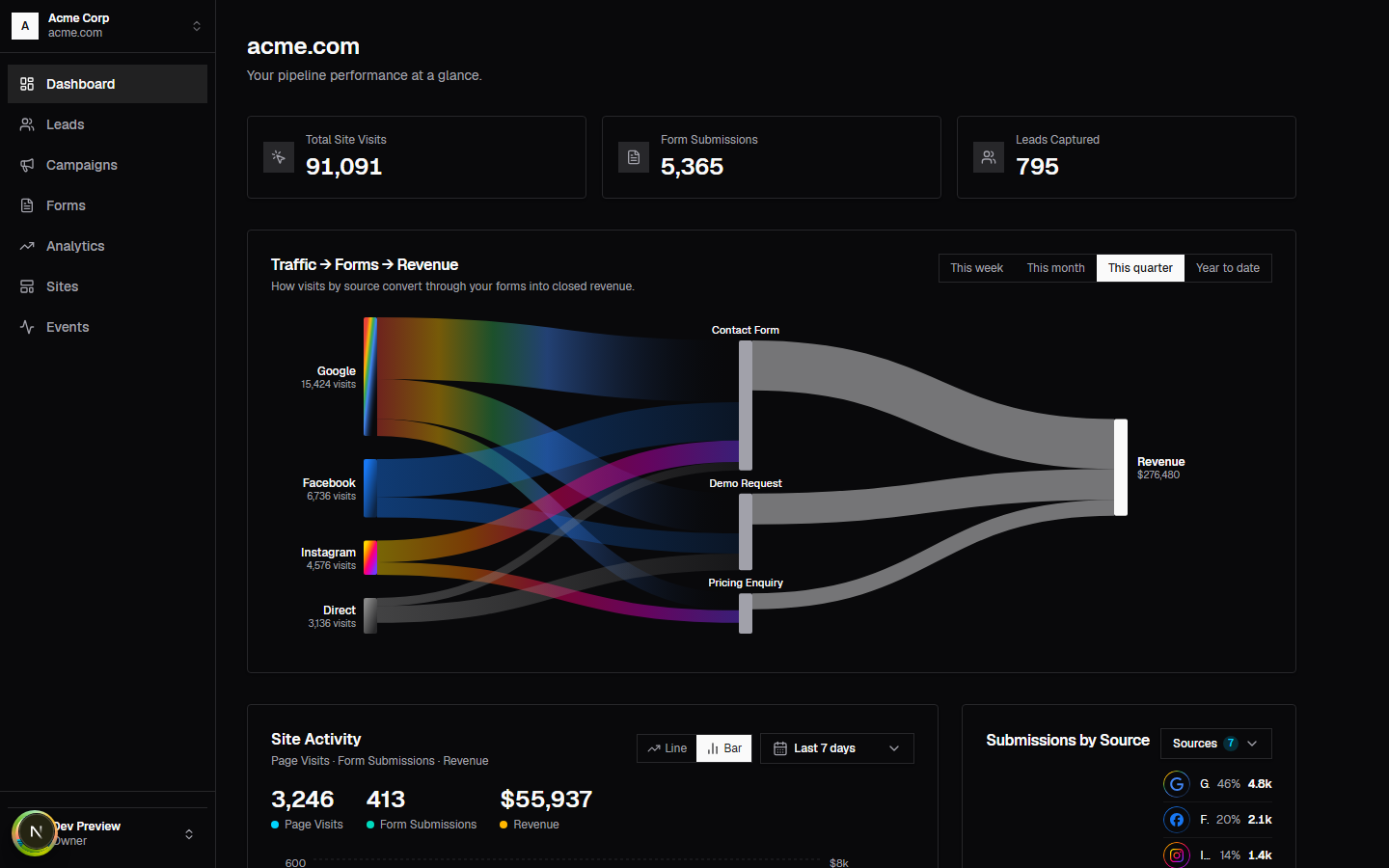
Counted automatically, no sync to run
Hidden fields, locked in from creation
Source attached the moment it arrives
Source to form to revenue, one diagram
Ready to automate your Snapchat lead tracking? Start integrating with Trakt.
Want to build it yourself? Use the stack selector widget below for steps specific to your CRM, or go straight to the 6-step setup.
Custom Snapchat CRM Setup Instructions: Choose Your Stack
Select your CRM, HubSpot, Salesforce, or Pipedrive, and your Snapchat ad type below to see the exact UTM, custom field, and lead-sync steps for your stack.
Pick a CRM and an ad type to get the steps
Pick a CRM and an ad type to get the steps
How to build Snapchat CRM integration: a 6-step setup
Step 1: Create custom tracking properties in your CRM
Show setup details
In your CRM's object settings (HubSpot: Settings → Properties; Salesforce: Object Manager → Contact/Opportunity → Fields & Relationships; Pipedrive: Settings → Data fields), create five custom single-line text fields, not a dropdown or picklist, since UTM values are open-ended and new campaigns launch every week:
- Original Source (
utm_source) - Original Medium (
utm_medium) - Original Campaign (
utm_campaign) - Source Creative (
utm_content) - Source Audience (
utm_term)
Create each one on both the Contact (or Lead) object and the Deal/Opportunity object. This is the step almost everyone skips, and it's the single most common cause of Snapchat attribution silently disappearing later, at conversion (see Step 4). Turn on field-level history tracking on all ten fields, five properties across two objects, so you can see exactly when a value was written, overwritten, or left blank. That history is what turns a broken pipeline into something debuggable instead of a mystery.
The internal name matters more than it seems: keep the CRM's display label human-readable ("Original Source") but store the API name in snake_case matching the UTM parameter it tracks (Salesforce will auto-suffix custom fields with __c, e.g. original_source__c), so your Zapier steps, API calls, and the next admin who touches this can find the field without guessing.
Ten fields across two objects and three possible CRMs is exactly the kind of setup that's easy to get half-right. Trakt creates and maintains this schema for you, HubSpot, Salesforce, and Pipedrive alike, so there's no field-by-field build to keep consistent. If you're doing it by hand anyway, here's the exact setup for your CRM and Snapchat ad type:
Setup notes by CRM and Snapchat ad type
| CRM | Ad type | Setup notes |
|---|---|---|
| HubSpot | Lead Ads |
|
| HubSpot | Web Swipe-Ups |
|
| HubSpot | Story Ads |
|
| Salesforce | Lead Ads |
|
| Salesforce | Web Swipe-Ups |
|
| Salesforce | Story Ads |
|
| Pipedrive | Lead Ads |
|
| Pipedrive | Web Swipe-Ups |
|
| Pipedrive | Story Ads |
|
Snapchat CRM integration for HubSpot
HubSpot is the most self-contained of the three: native Lead Gen integration for in-app leads, and Marketing Hub's own property-locking for everything else. Set the five Original Source/Medium/Campaign/Creative/Audience properties to "keep original value" on both Contact and Deal, then route swipe-up traffic through the same hidden-field pattern on your landing-page forms with a first-party cookie for same-device returns. The gap most teams hit is Story ads specifically: the default source report won't split Story traffic from Lead Ads or Web Swipe-Ups, so build a quarter-stamped campaign name into the URL and pull HubSpot's Original Source Drill-Down report filtered to snapchat to see it on its own.
Snapchat CRM integration for Salesforce
Salesforce has the field-level history tracking and validation rules to enforce first-touch-wins properly, but nothing does it for you by default the way HubSpot's property lock does. Sync Lead Ads via API, Zapier, or Workato, mapping Snapchat's Campaign ID to Original Campaign, then build a flow that promotes all five UTM fields from Lead to Opportunity on conversion, set to "don't overwrite." Web-to-Lead forms need the same five hidden fields plus a validation rule or flow standing in for HubSpot's native lock. For Story ads, a Connected Campaign ties the ad-level campaign to the Leads and Opportunities it produces, and a hashed-email match against your Customer List sync resolves the cross-device case.
Snapchat CRM integration for Pipedrive
Pipedrive is the CRM most likely to need Zapier or a CSV workflow rather than a native path, since it has no built-in contact-to-deal field carryover: all five custom fields have to exist on both the Person and the Deal, and an automation has to copy the UTM values onto the Deal at creation rather than inheriting them. Lead Ads usually mean a daily CSV export mapped to a custom Original Campaign field, or an API/Zapier sync for higher volume. Pipedrive also has no native cross-device identity match, so Story ads and Web Swipe-Ups both lean on a first-party cookie plus a CSV-based Customer List reconciliation to connect a mobile swipe to a desktop conversion.
Step 2: Configure form field mapping with hidden fields
Show setup details
Every lead form on your site, demo request, contact, newsletter signup, gated download, needs five hidden <input type="hidden"> fields, one per UTM parameter, with name attributes your CRM's form handler actually reads (a custom form can just POST utm_source, utm_medium, utm_campaign, utm_content, and utm_term directly as extra fields alongside name and email).
On page load, a small script reads window.location.search with URLSearchParams, pulls each of the five parameters, and writes them into the matching hidden inputs before the form can be submitted. If a parameter is missing from the current URL, which is common on a second or third page view, fall back to a first-party cookie set on the visitor's first landing, so a demo request submitted three clicks into the site still carries the original Snapchat parameters instead of arriving blank.
This is the step where "the UTM tagging on the ads is perfect" and "the lead lands with zero source data" turn out to both be true at once: the parameters die on the landing page if the form itself doesn't carry them forward. Test it before you trust it. Open a page with ?utm_source=snapchat&utm_campaign=test_q1, submit the form, and check the resulting Contact record for those exact values. Blank fields mean the hidden inputs aren't wired to the form handler yet, not that the tagging is wrong.
That's a script to write and a test to re-run on every new form your marketing team ships. Trakt's tracking snippet captures the same five parameters on every form automatically, no hidden inputs to add and no page-by-page testing to keep up with.
Step 3: Set up lead-source automation rules
Show setup details
Inside your CRM's workflow builder (HubSpot Workflows, Salesforce Flow, Pipedrive Automations), build a rule that fires the moment Original Source is set on a new Contact:
- Condition: Original Source equals
snapchat. - Action: Set a clean lead-source label field to "Paid Social – Snapchat," separate from the raw UTM value, so sales-facing reports and list views don't have to parse
utm_sourcestrings. - Action: Assign or round-robin the contact to the sales pod that knows how to sell into a Snapchat-sourced lead. Snapchat skews younger and more mobile-first than most other paid channels, and the pitch that works on a LinkedIn lead can fall flat here.
- Action: Post a Slack or Teams notification to the assigned rep, via the CRM's native integration where one exists, or a Zapier/Workato step where it doesn't.
Speed-to-lead is not a nice-to-have. Harvard Business Review research found that contacting prospects within an hour makes you 7x more likely to have a meaningful conversation than waiting even a little longer, and Snapchat's younger, more distractible audience makes that window less forgiving, not more. Five minutes end to end, from workflow trigger to Slack ping in the rep's hand, is the actual target, not same-day follow-up.
Building and babysitting that workflow inside your CRM's own automation builder is real ongoing maintenance, not a one-time setup. Trakt routes and notifies automatically the moment a Snapchat lead lands, so there's no workflow logic to build or debug when it quietly stops firing.
Step 4: Implement deal-level attribution carryover
Show setup details
This is the step that fails silently, because the CRM never throws an error. It just quietly stops reporting correctly. The mechanism is different on every platform:
- HubSpot: contact-to-deal inheritance isn't automatic for custom properties. Go to Settings → Properties → Deal properties, and for each of the five fields, enable "Copy from associated Contact," or build a workflow that copies them on deal creation if that setting isn't available on your plan.
- Salesforce: build a Flow (or Process Builder on an older org) that fires on Opportunity creation, reads the five custom fields off the source Lead or Contact, and writes them onto the new Opportunity. There is no native inheritance here.
- Pipedrive: Deals do not inherit Person fields at all. You need a native automation, or a Zapier step, that copies the five values onto the Deal the moment it's created.
In every case, set the deal-level fields to "keep original value" (or the platform's equivalent "don't overwrite" setting). That single setting is what stops a later re-engagement touch, a newsletter click, a retargeting ad, from silently wiping the Snapchat first-touch credit months into the deal. Audit this monthly: pull five recently closed deals at random and confirm all five UTM fields are present and match the original lead record. If even one is blank, the leak is at the object handoff, not in the original tracking.
Three different platforms, three different workarounds, and a monthly audit to make sure none of them quietly broke, this is the step most likely to eat an afternoon a month. Trakt carries attribution from contact to deal automatically on every CRM, so there's no per-platform mechanism to build or re-check.
Step 5: Define a revenue attribution window
Show setup details
Most CRMs default their attribution reporting window to 90 days, a Google Analytics convention, not a reflection of your actual sales cycle. Snapchat is usually an upper- or mid-funnel channel, the swipe-up rarely converts in the same session, so the window needs to be set deliberately:
- 30 days for DTC e-commerce (short consideration, impulse-adjacent)
- 60 days for prosumer or SMB self-serve
- 90 days for SMB B2B (a real evaluation cycle, but still fast)
- 120+ days for enterprise (multiple stakeholders, procurement cycles)
In HubSpot this lives in the attribution report's own settings; in Salesforce it's a date-range filter on your custom report type, usually Lead Created Date against Opportunity Close Date. Pull your own sales-cycle-length report first, the median days from Lead Created to Closed Won, and set the window a little wider than that median rather than narrower, or you will systematically undercount every Snapchat-sourced deal that took slightly longer than average to close.
Pulling that sales-cycle report and translating it into the right filter is easy to get around to "next quarter." Trakt sets a revenue attribution window automatically, tuned to how your deals actually close instead of a platform default.
Step 6: Real-time sales notifications with creative context
Show setup details
When a Snapchat lead converts, the notification to the assigned rep needs to do more than announce a new lead. It needs to hand them the exact hook the prospect already saw:
New Snapchat lead: [Contact Name]
Campaign: q2_pipeline_2026
Creative: testimonial_v2
Audience: cart_abandoner_7d
[Link to CRM record]
Build this from the same automation as Step 3, using your CRM's native Slack or Teams integration (HubSpot and Salesforce both ship one) or a Zapier step if you're on Pipedrive or a lower tier, just with the Source Creative and Source Audience fields interpolated into the message.
The payoff is entirely in how the rep opens the call. "Hi, I saw you were looking at Trakt" is a cold open. "Hi, I noticed you were checking out the ROI calculator right after our testimonial video" is a warm one, and it's the difference between a prospect who feels tracked and one who feels understood. Coach reps to reference the specific creative in the first thirty seconds of the discovery call, before they ask a single qualifying question.
Keeping that template in sync with your fields, and making sure it actually fires, is one more workflow to maintain on top of the five before it. Trakt sends the same creative-aware alert automatically, so reps get the context without your team building or babysitting the notification.
If you want each Snapchat form submission stored with its source while you finish the CRM mapping, pre-register for Trakt.
Why Snapchat CRM integration matters
Snapchat CRM integration is the technical and process bridge that records every Snapchat campaign interaction (swipe-up, lead-form submission, Snap Pixel event) on the corresponding contact, opportunity, and deal record inside your customer relationship management system. It typically involves five custom CRM properties mapped to UTM parameters, hidden form fields on every landing page, a first-party cookie that persists the original Snapchat source across device hops, and a lead-sync workflow that either pushes Snapchat's native lead-ad data into the CRM via Zapier or API, or imports it as a CSV.
In short: Snapchat CRM integration is how a mobile swipe becomes a credited line on your revenue dashboard.
Most Snapchat reports stop the moment the user leaves the app. Native dashboards show creative engagement, swipe-ups, and Pixel events with high fidelity. They show nothing about which of those swipe-ups produced revenue, which campaign sourced your fastest-closing deals, or which creative hook your sales team should reference on a discovery call.
The Trakt team breaks down the wider attribution gap in The Definitive Snapchat Marketing Strategy for Revenue-First Attribution and the reporting-layer companion in Why Your Snapchat Analytics Tool Needs a Revenue Reality Check. For the ROI math that this integration unlocks, see Snapchat ROI: How to Measure Real Revenue Beyond Swipe-Ups.
Salesforce research indicates that 73 percent of customers expect companies to understand their unique needs. A lead that arrives in the CRM with no source data forces the sales team to start from zero. A lead that arrives with Snapchat campaign, creative, and audience attached lets the rep open the call with the exact hook the prospect engaged with.
Snapchat CRM integration vs. basic Snapchat tracking
| Capability | Basic setup | Snapchat CRM integration |
|---|---|---|
| Lead source on contact | Often "Direct" or empty | Always snapchat with campaign + creative |
| ROAS calculation | Estimated via Pixel | Calculated from CRM deal value |
| Sales context on the call | Cold inbound | Specific creative and audience attached |
| Cross-device attribution | Lost at the device hop | Identity-bridged via cookie + CRM list match |
| Pipeline reporting | By lead volume | By revenue, deal velocity, and creative |
| Data integrity | Manual spreadsheet entry | Standardized via middleware |
| Source overwrite risk | High (last touch wins) | Locked (first touch protected) |
Basic tracking tells you that Snapchat drove clicks. CRM integration tells you which Snapchat campaign drove the deal that closed Friday.
The Snapchat CRM field map
Five custom properties on the contact record and the deal record. This is the minimum schema for a working Snapchat CRM integration.
| CRM property (Contact + Deal) | Source UTM parameter | Captures |
|---|---|---|
| Original Source | utm_source | snapchat |
| Original Medium | utm_medium | paid_social, organic_social, retargeting |
| Original Campaign | utm_campaign | Campaign + quarter (e.g., q2_pipeline_2026) |
| Source Creative | utm_content | Specific creative or hook (e.g., testimonial_v2) |
| Source Audience | utm_term | Audience segment (e.g., cart_abandoner_7d) |
Two non-negotiables when configuring these fields:
- They must exist on both Contact and Deal objects so attribution survives when a lead converts into an opportunity.
- They must be set to "keep original value" so a later organic search or direct visit does not wipe the Snapchat first touch.
For the underlying UTM schema, see How to Set Up UTM Parameters for Snapchat Ads.
The disconnected-lead pattern (and what fixes it)
A prospect named Sarah sees a Snapchat ad at the airport, swipes up, browses for 40 seconds, and her flight boards. Three days later she remembers the product and types the URL directly into a desktop browser at the office. She fills out a demo form.
In a default setup, Sarah is now a "Direct" lead. Marketing gets no credit for the swipe. Sales receives a contact with no context, treats it like cold inbound, and the discovery call opens flat. The thread is broken.
In a CRM-integrated setup, Sarah's first visit dropped a first-party cookie carrying utm_source=snapchat plus the campaign and creative. When she returned three days later on desktop, the cookie was still on her phone, not on her laptop. So this is where identity bridging matters: a hashed-email match (from the CRM Customer List sync she was already in) or a persistent identifier (logged-in account, magic-link click) ties the two sessions together. When she submits the form, the contact lands with the original Snapchat campaign attached.
For the cross-device mechanics, see Tracking Snapchat Campaigns Across Devices.
How to download leads from Snapchat native lead-gen forms
Snapchat's native lead-ad forms (Lead Gen Sequence) capture leads inside the app, which means the data does not automatically flow to your CRM unless you wire it up. Two options:
| Method | Best for | Setup effort |
|---|---|---|
| API or Zapier integration | Real-time CRM sync, high-volume accounts | Higher upfront; pays back at scale |
| CSV export on a schedule | Lower-volume accounts, agencies pulling for clients | Lower upfront; requires manual or scheduled import |
The CSV path looks like this:
- Open Snapchat Ads Manager and navigate to the Lead Gen ad set.
- Select On-Demand or Bulk download for lead ads.
- Choose the campaign and date range, and include header rows for all custom questions.
- Export as CSV.
- Map the Snapchat column headers to your CRM import fields. Specifically, map the Snapchat Campaign ID to your CRM Original Campaign property so the lead lands attributed.
- Import via your CRM's native importer, with deduplication keyed on email.
Speed matters. Harvard Business Review's study on online lead response found that contacting a lead within an hour produces dramatically better conversation rates than waiting longer. Anything slower than a daily sync makes Snapchat lead-gen ads underperform their real potential.
Pipeline-stage attribution carryover
The most expensive failure in Snapchat CRM integration is letting attribution die at the contact-to-deal handoff. Each pipeline stage needs the right data attached.
| Pipeline stage | Required attribution data | Business outcome |
|---|---|---|
| Lead generation | Original Source + Original Campaign | Verifies channel effectiveness |
| Sales qualification | Source Creative | Lets reps personalize the discovery call |
| Opportunity creation | All five UTMs carried to the deal record | Accurate pipeline forecasting by source |
| Closed-won | Deal value + original UTMs | True ROI by Snapchat campaign and creative |
| Lost / no decision | All five UTMs preserved on the closed-lost reason | Improves future targeting and creative |
If any field drops on the conversion from contact to deal, your reporting becomes incoherent. Audit the field map on the day you build it and re-test it monthly.
Common Snapchat CRM integration failures
- Custom properties exist on Contact only, not on Deal. Attribution dies the moment a lead converts.
- CRM property set to overwrite. A later touch wipes Snapchat first-touch credit.
- Hidden form fields not mapped to the properties. UTMs hit the page and die before the CRM sees them.
- No source-based routing. Snapchat leads sit in a queue and miss the speed-to-lead window.
- No native lead-form sync. Snapchat in-app lead ads pile up in Ads Manager while sales waits.
- Lead source field manually maintained. Reps forget to tag it, and the data integrity collapses.
- No identity bridge for cross-device. Mobile swipes never connect to desktop conversions.
For the retargeting-specific variant of these failures, see Snapchat Retargeting: How to Track, Attribute, and Set Up Retargeting Ads That Drive Revenue. For the broader tracking framework, see The Marketer's Guide to Tracking Snapchat Campaigns in 2026.
Where to go next
This article sits inside the Trakt Snapchat cluster. The pillar plus the rest of the series:
- The Definitive Snapchat Marketing Strategy for Revenue-First Attribution, the strategic pillar this article supports
- The Marketer's Guide to Tracking Snapchat Campaigns in 2026, the broader tracking framework
- Snapchat ROI: How to Measure Real Revenue Beyond Swipe-Ups, the ROI math that this integration unlocks
- Snapchat Retargeting: How to Track, Attribute, and Set Up Retargeting Ads That Drive Revenue, the retargeting-specific application
- How to Set Up UTM Parameters for Snapchat Ads, the underlying UTM schema
- Tracking Snapchat Campaigns Across Devices, the cross-device bridging
- How to Track Snapchat Story Ads Driving to Your Website, for Story-ad-specific integration
- How To Measure Dark Social from Snapchat Shares, for share-driven attribution recovery
- Tracking Snapchat AR Lenses and Filters for ROI, for AR-specific CRM integration
- How to Use Snap Codes in Offline Campaigns, for offline-driven CRM attribution
- Why Your Snapchat Analytics Tool Needs a Revenue Reality Check, the reporting-layer companion
The brands winning on Snapchat in 2026 are not the ones with the cleverest creative or the lowest CPM. They are the ones whose CRM tells them, deal by deal, exactly which Snapchat campaign produced the revenue that closed last week.
Snapchat CRM FAQ
What is Snapchat CRM integration?
Snapchat CRM integration is the technical and process bridge between Snapchat campaign data and your CRM contact, opportunity, and deal records. It uses custom CRM properties, hidden form fields, a first-party cookie, and a lead-sync workflow to ensure every Snapchat swipe-up arrives in the CRM with the campaign, creative, and audience that produced it.
How do I track Snapchat campaigns inside my CRM?
Create five custom properties on both Contact and Deal objects (Original Source, Original Medium, Original Campaign, Source Creative, Source Audience), add hidden form fields to every site form that read UTMs from the URL and write them to those properties, configure the properties to keep their original value, and build a workflow that routes Snapchat-sourced leads to the right sales pod within five minutes of submission.
How do I download leads from Snapchat?
Snapchat native lead-gen ads keep leads inside Ads Manager unless you wire up an integration. Either connect via API or Zapier for real-time sync, or schedule a CSV export from the Bulk download option in Ads Manager and run a daily import to your CRM. The CRM Campaign ID field should map to Snapchat's campaign ID so leads land already attributed.
Which CRM properties should I create for Snapchat tracking?
At minimum: Original Source (utm_source), Original Medium (utm_medium), Original Campaign (utm_campaign), Source Creative (utm_content), and Source Audience (utm_term). Create them on both Contact and Deal objects, and set them to "keep original value" so a later marketing touch never overwrites the Snapchat first touch.
How long should my Snapchat attribution window be in the CRM?
Match the window to your sales cycle, not Snapchat's default. 30 days for DTC e-commerce, 60 days for prosumer, 90 days for SMB B2B, and 120+ for enterprise. The window has to cover the gap between the mobile swipe and the desktop conversion in your real customer journey.
Why are my Snapchat leads coming into the CRM as "Direct"?
Three usual causes. UTM parameters are missing from the Snapchat ad URL, hidden form fields are not mapped to CRM properties, or the prospect converted on a different device and there was no identity bridge to reconnect the sessions. Fix the UTMs first, then the form fields, then layer in a first-party cookie or hashed-email bridge.
Can I integrate Snapchat lead-gen ads with HubSpot or Salesforce directly?
Yes for both. HubSpot offers a native Snapchat integration via the Marketing Hub and also supports Zapier-based syncs. Salesforce supports both API integration and Zapier/Workato connectors. Either way, the critical step is mapping Snapchat's Campaign ID and form-field values to your custom Original Source and Original Campaign CRM properties so leads land attributed.