

How do you add UTM parameters to Google Ads?
To add UTM parameters to Google Ads, put utm_source=google, utm_medium=cpc, utm_campaign={campaignid} and utm_term={keyword} once in the account's final URL suffix and leave auto-tagging on. Google fills in the values on every click, and your form still has to store them with the lead. Tools like Trakt build consistent UTM links.
Quick start: Start free with Trakt to build consistent Google Ads UTM links, keep them in a first-party cookie for 90 days and record each form submission with that source. Or follow the manual steps below.
Need a single link? Use Google's Campaign URL Builder or Trakt's UTM builder. Tagging a whole ad account? Use the suffix below.
- Add the parameters once in Google Ads. A final URL suffix such as
utm_source=google&utm_medium=cpc&utm_campaign={campaignid}&utm_term={keyword}tags every ad that doesn't already have a more specific setting. - Leave auto-tagging on. It adds the gclid that Google Ads and GA4 use. Your CRM still needs the UTMs.
- Check the landing URL. A redirect that drops the query string drops both the UTMs and the gclid.
- Store them with the lead. Hidden fields, or a script that remembers the visit, are what stop the CRM from writing "Website."
Google ad click → UTM parameters on the landing page URL → form or stored visit → CRM source → closed revenue by campaign.
What do Google UTM parameters look like?
A Google UTM is one parameter on that link. "UTMs Google" means the set of them. UTM stands for Urchin Tracking Module, the analytics product Google bought and turned into Google Analytics. Google Ads used to be called AdWords, and the parameters did not change with the name.
A bare landing page:
https://example.com/demo
The same page as a Google UTM link:
https://example.com/demo?utm_source=google&utm_medium=cpc&utm_campaign=brand-search&utm_term=crm-software
Everything after the ? is the tracking. utm_source=google says where the click came from. utm_medium=cpc says it was paid search. utm_campaign names the effort. utm_term is the keyword slot. utm_content is there when you need to tell two ads apart.
Values are case-sensitive. google and Google are two sources in Analytics. Pick lowercase and keep it. Google's own URL builders guide is the reference for the parameter names, and it tells you to read the result in the Traffic acquisition report.
One tagged link is enough for a newsletter or a partner email. An ad account is a different job. You do not paste that URL into every ad. You set the pattern once and let Google fill in the keyword and the campaign id.
Final URL suffix vs tracking template: which should you use?
UTM tracking in Google Ads is an account or campaign setting, not a spreadsheet of final URLs. Google calls the two fields a final URL suffix and a tracking template. Use the suffix when you only need parameters on the landing page. Use a template when a redirect tracker has to see the click first. For a normal site, the suffix is the one that is harder to break, because a tracking template that forgets {lpurl} sends people nowhere.
A suffix and a template can both be set. The suffix is appended to the final URL. The template is a separate field, and if you fill it in at more than one level, Google uses the most specific: keyword, then ad, then ad group, then campaign, then account. An old template on a single ad replaces the account template. The Tracking template source column shows which one served.
Smart campaigns do not support an account-level tracking template. Don't rely on that field for them.
Google Ads UTM parameters list
| Parameter | What to put | What you can report |
|---|---|---|
utm_source | google | The platform. One spelling. |
utm_medium | cpc for Search. display, shopping, or video when that is the campaign. | The channel. |
utm_campaign | {campaignid}, or a custom {_campaign} you define | Which campaign. Google has no ValueTrack for the campaign's name. |
utm_term | {keyword} | The keyword in your account that matched. Not the raw search, and blank when the campaign has no keyword. |
utm_content | {creative} or {matchtype} | The ad id, or the match type: e exact, p phrase, b broad, a for an AI Max keywordless match. |
utm_id | Optional. The same campaign id you use elsewhere. | GA4 can store it. Skip it if {campaignid} already covers you. |
{keyword} returns the keyword from the account, and it is empty for a Dynamic Search Ad. Performance Max often has nothing to put in utm_term. Use the campaign id there. The full ValueTrack list is in Google's tracking template article, and match-type values including a are in About ValueTrack parameters.
Which of those keywords actually close is a different report. How to track Google Ads keywords to closed deals starts where this template stops.
Final URL suffix
Paste the query string only. No ?, no {lpurl}.
utm_source=google&utm_medium=cpc&utm_campaign={campaignid}&utm_term={keyword}&utm_content={matchtype}
If the landing page already has its own query string, Google joins yours with &.
Account-level URL options live under the Admin icon, then Account settings, then Tracking. That is the same Tracking area Google documents for account URL options. The help article's numbered clicks for the suffix start at campaign level: Campaigns, then the Settings tab, then the pencil in the Tracking template column, then the Final URL suffix field, then Save.
Tracking template
A template has to insert the landing page. This one matches the suffix above:
{lpurl}?utm_source=google&utm_medium=cpc&utm_campaign={campaignid}&utm_term={keyword}&utm_content={matchtype}
{lpurl} goes first. At campaign level, Google's clicks are: Campaigns, Settings, add the Tracking template column, pencil, Test, Save. The Test button builds the URL immediately. Serving can lag. Google says tracking-template edits take 24 to 48 hours to show on live ads.
A readable campaign name
{campaignid} is a number. Fine for a join back to Google Ads. Useless in a sales view. A custom parameter fixes that. You name it, up to 16 letters or numbers, and you set the value yourself.
Custom parameters cannot be created at account level. Per campaign: Campaigns, Settings, open the campaign, Additional settings, Campaign URL options, Custom parameter. Google's walkthrough is Create custom parameters. Define {_campaign} as brand-search, then use {_campaign} in the suffix. Leave it undefined and the URL contains an empty value.
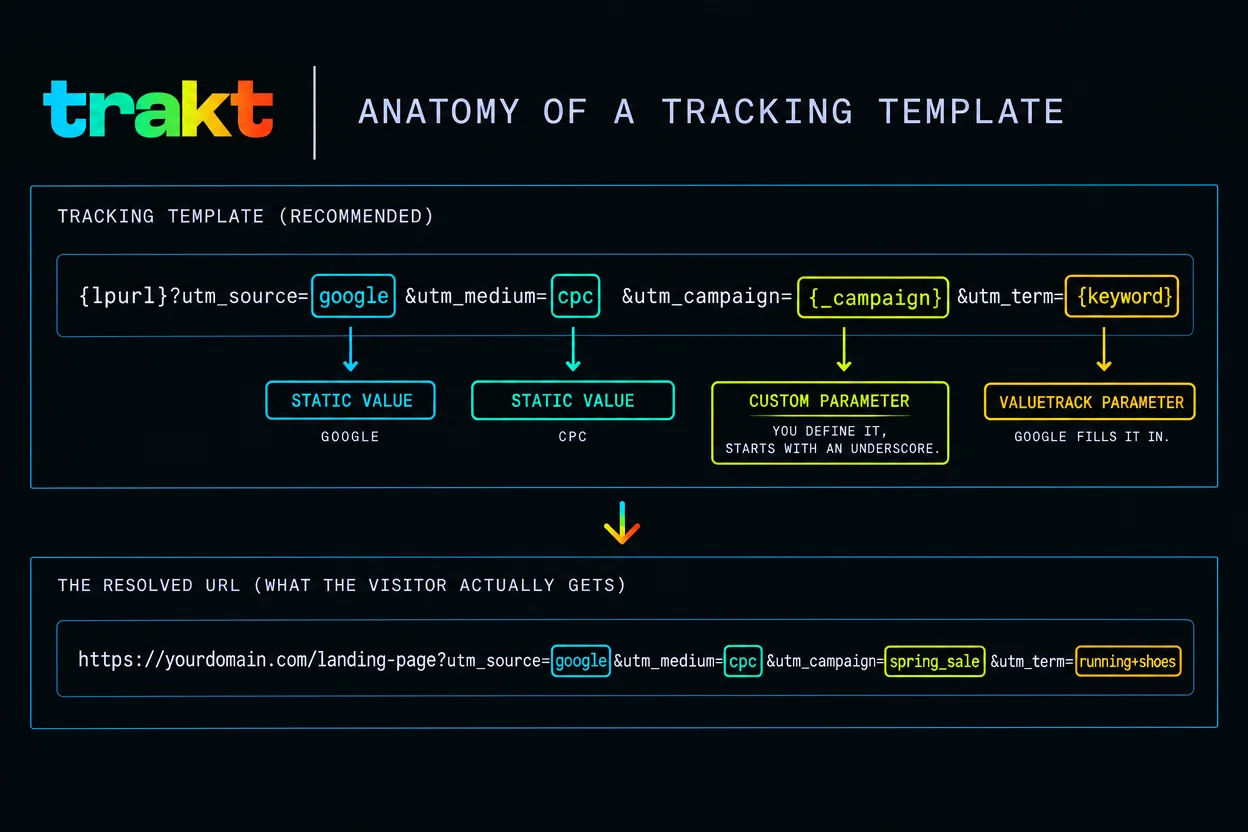
Click one of your own ads after the change has had time to serve. The address bar should show real values, not braces.
If you want the suffix values and naming kept consistent in a builder rather than in a doc, pre-register for Trakt.
What is a UTM builder for Google Ads?
A UTM builder for Google Ads is anything that writes those parameters the same way every time. Inside the ad account, the final URL suffix is the builder. You are not generating a link per keyword. Google fills {keyword} and {campaignid} on the click.
Google also ships a free Campaign URL Builder. It asks for the website URL, source, medium, and either a campaign name or a campaign id. Term and content are optional. It returns one URL. That is the right tool for a single partner link. It is a bad tool for 400 ads, because the next person will type Google or google-ads and split the source.
Trakt's UTM builder is the same kind of one-link tool, with a fixed list of sources and mediums so two people can't invent two spellings. Use it to decide the names. Then paste the pattern into the suffix so the account stays consistent. If you are choosing among builders, the best UTM builder tools compared covers the field. This page only covers the Google Ads job.
There is no separate "Google UTM manager." People use that phrase for the Campaign URL Builder, for Google Tag Manager, or for a spreadsheet. Tag Manager can read a URL. It does not invent the parameters, and it does not apply them to your ads.
Where do you see Google UTM data after the click?
There is no product called a Google UTM tracker. After the click, the same parameters show up in three places.
- GA4. Traffic acquisition, on the Manual source, Manual medium, Manual campaign, Manual term, and Manual ad content dimensions. Those are the UTM reports.
- The URL itself. If the parameters are in the address bar, the click was tagged. If they vanished, nothing downstream can recover them.
- The lead record. This is the one that matters for revenue. The CRM field that holds
utm_campaignis the report a founder can take to a budget meeting.
Google Ads has its own campaign and keyword reports, fed by the gclid. Those are not the UTM record. They stop at Google's conversion, which is often a form fill, not a paid invoice.
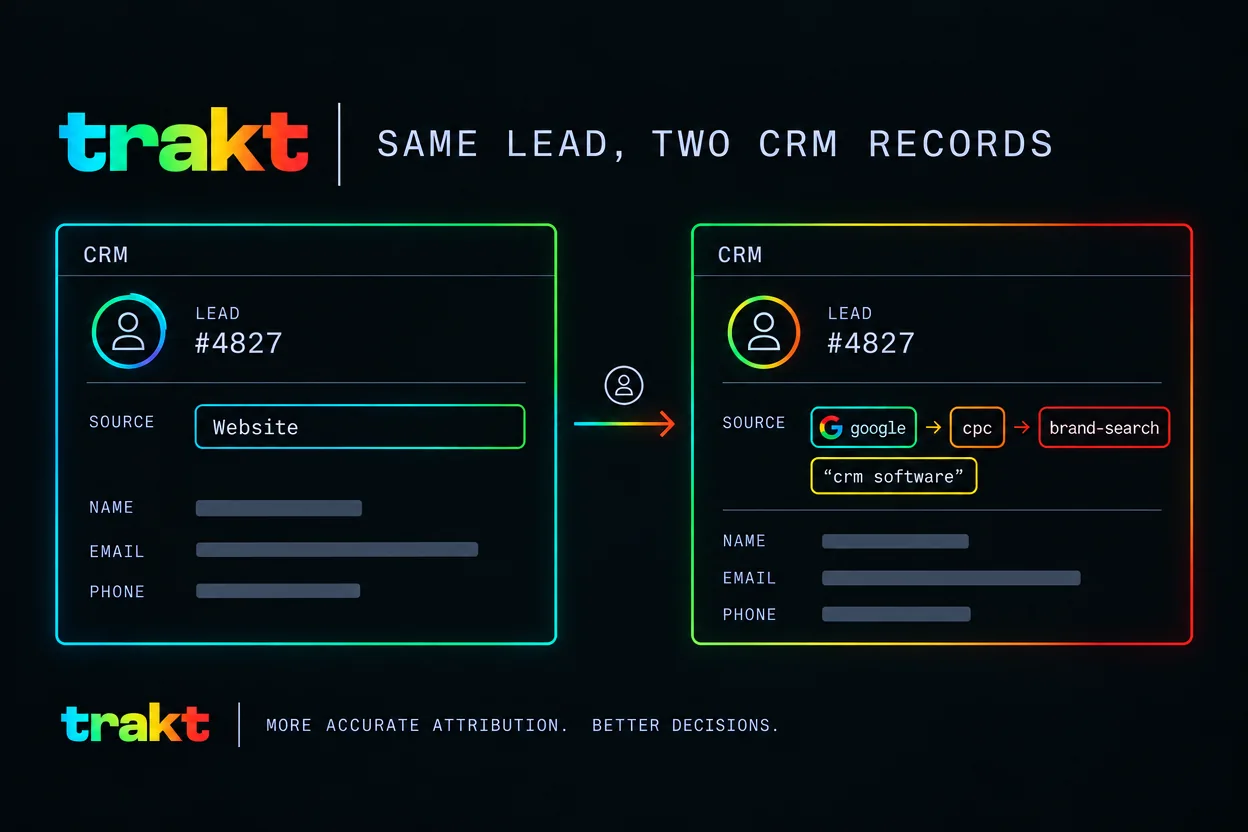
GA4 will show a Google Ads campaign from the gclid. Your CRM will show whatever survived on the lead. When those disagree, believe the lead if the question is revenue, and believe GA4 if the question is which query got the click.
The wider stack, pixels included, is in the Google Ads tracking playbook. Display banners need the same suffix with a different medium, and how to track banner ads in Google Analytics covers that case.
How do you set up Google Analytics UTM tracking?
Google Analytics UTM tracking is the manual half of GA4's traffic source. Add utm_source, utm_medium, and utm_campaign to the URL. GA4 maps them to Manual source, Manual medium, and Manual campaign name. utm_term and utm_content map to Manual term and Manual ad content. Google documents the full map in Traffic-source dimensions, manual tagging, and auto-tagging.
Two extra parameters exist, utm_creative_format and utm_marketing_tactic. Google's URL builder docs say they are not currently reported in GA4 properties. Don't build a process around them.
GCLID vs UTM
You want both. Auto-tagging is on by default for new Google Ads accounts. The checkbox is Admin, Account settings, Auto-tagging, "Tag the URL that people click through from my ad." Google's auto-tagging article is the source for that path, and it says GA4 has no switch to let manual tags override the gclid.
What that means on a real click:
- Source, medium, and the Google Ads campaign dimensions come from the gclid when auto-tagging works.
utm_termandutm_contentstill populate Manual term and Manual ad content.- Your form does not read GA4. It reads the URL. The UTMs are still sitting there for the CRM.
If the gclid never arrives (a redirect stripped it, or the landing page rejected the parameter) and any UTM is present, GA4 builds the whole source from the UTMs. One lonely utm_content then leaves source and medium as (not set). Set the full set or set none.
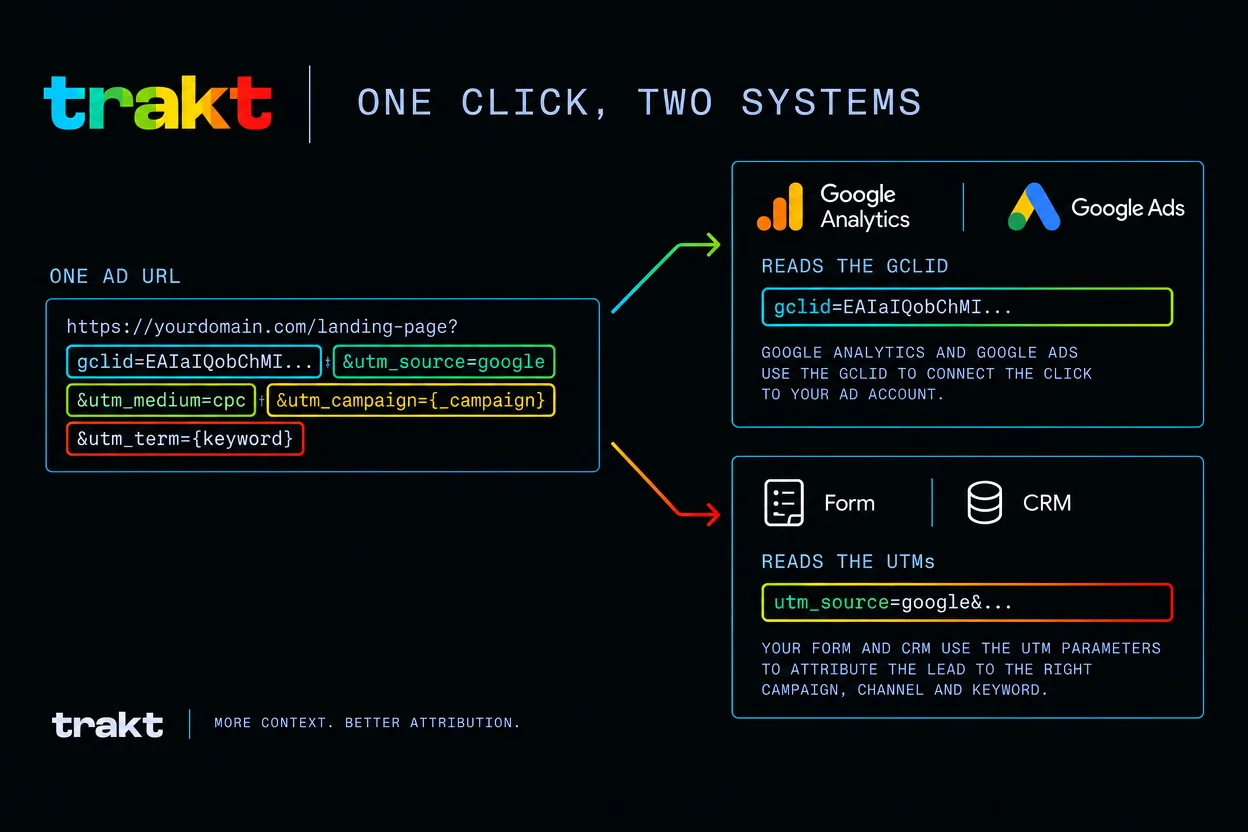
Old Universal Analytics had a property setting that let UTMs override auto-tagging. That setting is not in GA4. If a guide tells you to flip it, the guide is describing a product Google has already shut down.
Why do the UTMs never reach the deal?
The suffix can be perfect and the CRM can still say Website. Three breaks show up over and over.
The redirect drops the query string
The ad lands on lp.example.com/offer?utm_source=google&..., and that host redirects to example.com/offer without copying the query. UTMs gone. Gclid gone. Google's auto-tagging docs call this out for the gclid, and the same redirect kills UTMs. Click your own ad and read the final address bar, not the URL you typed into the ad.
The form never reads them
The page URL is tagged. The form posts name, email, and company. No hidden fields, no script. The lead is born without a source. Why UTM data disappears at form submission goes through the causes. HubSpot's built-in source field is one of the traps, and how to pass UTM parameters into HubSpot forms is the specific fix. The CRM side of the same gap is how to attribute Google Ads leads inside your CRM.
The visit and the form are not the same session
Someone clicks today, comes back next week by typing the domain, and then fills the form. That second visit has no parameters. A different laptop has none either. UTM tracking follows the browser that clicked.
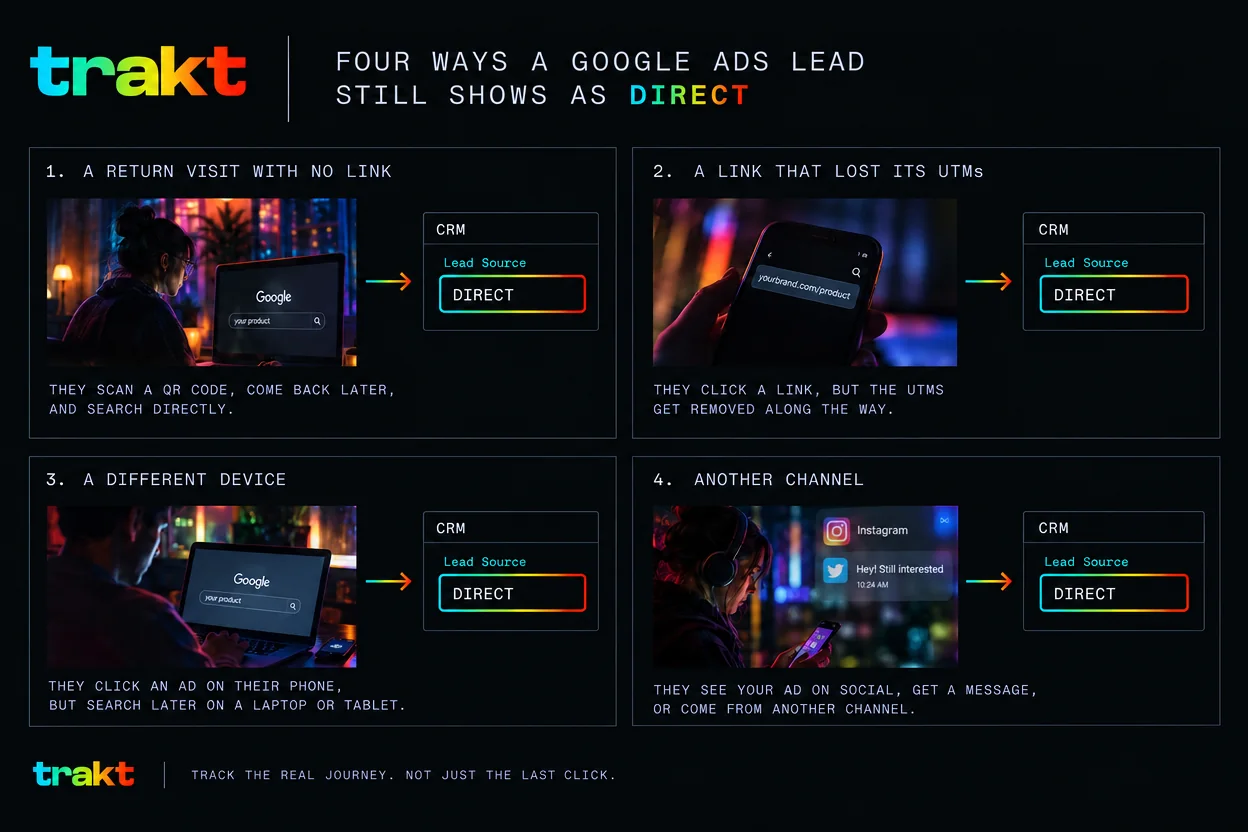
Some of those leads will stay Direct. A "How did you hear about us?" field covers a few of them. Why leads show up as Direct in the CRM is the longer diagnosis. Once the ones you can track are actually tracked, revenue by campaign is a CRM report of closed-won deals filtered on the campaign field. How to measure Google Ads ROI from closed revenue is that calculation. Google's own conversion value is a different number, and it will not match.
Why manual Google Ads UTM setup breaks in practice (and how Trakt helps)
The suffix works. It also rots. Three things go wrong after the first careful setup.
- The names drift. The next campaign is
Google, orcpcbecomespaid. Analytics splits one channel into three. - Every new form needs the fields again. A rebuilt page ships without them. Leads go quiet.
- The click and the form are a week apart. The URL was tagged on Monday. The demo request is the following Tuesday, with a clean address bar.
How Trakt closes the gap
Trakt's UTM builder uses a fixed list of sources and mediums, so the names stay boring on purpose. Trakt then stores the UTMs in a first-party cookie for 90 days. A form submitted later, in that same browser, still has them. The submission is recorded with that source attached, including when the form has no hidden fields. In Trakt's leads pipeline, a won deal's value is credited to the source captured at submission.
That is not your Salesforce or HubSpot record. If revenue is reported in a CRM you already run, the hidden fields and the field mapping above are still how the values get there. Trakt does not sync the deal for you, and it does not stitch a phone click to a laptop form. One browser, one source on the lead.
Manual setup vs. Trakt, by requirement
| Requirement | Manual | Trakt |
|---|---|---|
| Same names on every link | A written convention, kept by hand | Fixed source and medium lists in the UTM builder |
| Source on the submission | Hidden fields, added per form | Recorded with the submission, no hidden fields needed |
| A form filled days later, same browser | Your own cookie or script | First-party cookie, 90 days |
| Revenue by campaign | A report you build in the CRM | Won deal value credited to the captured source in Trakt's pipeline |
| UTMs inside the CRM you already use | Same either way: hidden fields on the form, mapped to CRM properties | Same either way: hidden fields on the form, mapped to CRM properties |
Where to start
Pick one Search campaign. Not the account.
- Add the final URL suffix on that campaign, with
utm_source=google,utm_medium=cpc,utm_campaign={campaignid}, andutm_term={keyword}. - Define
{_campaign}only if you want a readable name, and only on that campaign. - Use the Test button, then click the ad once the change has served. Read the address bar.
- Submit the form with your own email. Open the lead. The first empty UTM field is the thing to fix.
Do the rest of the account after one lead carries google all the way through. If the names are the part your team keeps getting wrong, build the first link in Trakt's UTM builder and copy the pattern into the suffix.
If you want those source names in the product rather than in a doc, pre-register for Trakt. The form asks for a work email and pre-builds the workspace, including the source list, before the account exists.
Frequently asked questions
What is UTM Google?
UTM Google means a URL carrying UTM parameters that mark a visit as coming from Google, most often utm_source=google plus a medium and a campaign. UTM stands for Urchin Tracking Module, the analytics product Google bought and turned into Google Analytics. On Google Ads you add the parameters once, in a final URL suffix or a tracking template, so every click is tagged the same way. A link you build by hand is the same idea, limited to that one URL.
What is a Google UTM tracker?
A Google UTM tracker is not a product Google sells. People use the phrase for GA4's manual campaign reports, for Google's free Campaign URL Builder, or for whatever stores the parameters after the visitor leaves the landing page. Google Tag Manager can read a URL. It does not create the parameters, and it does not keep them until a form is submitted days later. The tracker that changes a budget is the CRM field that still holds the campaign when the deal closes.
Do UTMs work with Performance Max?
Yes. A final URL suffix still adds utm_source, utm_medium, and utm_campaign on Performance Max clicks, and auto-tagging still adds the gclid. Performance Max does not target keywords, so {keyword} in utm_term is often empty. Use {campaignid}, or a custom {_campaign} you define on that campaign, to tell it apart from the others. A blank utm_term there is the campaign type, not a broken suffix. Dynamic Search Ads have the same empty {keyword}.
Why does GA4 show (not set) for my Google Ads traffic?
GA4 shows (not set) when it cannot use the gclid and the UTMs on the URL are incomplete. Google's documentation says that if the gclid fails and any UTM parameter is present, GA4 builds every traffic-source dimension from the UTMs, and a missing one is reported as (not set). A redirect that drops the query string does this. So does a suffix that sets only utm_content. Set utm_source, utm_medium, and utm_campaign together. Your form reads the URL, not the GA4 row, so Analytics can say (not set) while the CRM still has the campaign.
Do I need UTM parameters if Google Ads auto-tagging is on?
Yes, if closed revenue in a CRM is the number you report. Auto-tagging adds a gclid that Google Ads and GA4 understand. Most CRMs do not read it, so the lead shows up as Website or Direct. Keep auto-tagging on, and add UTMs with a final URL suffix or a tracking template. The URL then carries both, and each system reads the value it knows. The form still has to capture the UTMs, or the CRM never sees them.