

What is keyword revenue tracking?
Keyword revenue tracking stores the Google Ads keyword that matched each click on the resulting lead and closed deal, so you can rank keywords by revenue instead of clicks. It needs utm_term={keyword} in the tracking template, a form that captures it, and a copy onto the deal. Tools like Trakt record each form submission with its stored UTMs.
Quick start: Start free with Trakt to keep the utm_term from the latest tagged visit for 90 days and record each form submission with it. Or follow the manual steps below.
Four steps:
- Put the keyword on the click. Add
utm_term={keyword}to a tracking template that starts with{lpurl}, so Google fills in the matched keyword. - Keep it on the landing page. A redirect that drops the query string removes the keyword before anyone sees a form.
- Capture it on the form. The form needs a hidden field that reads
utm_termand submits it with the lead. - Copy it onto the deal. Map the keyword into the CRM, then copy it from the contact to the deal. A closed-won report grouped by that field is the revenue number.
Keyword click → utm_term on the landing page → hidden form field → CRM contact, then the deal → closed revenue by keyword.
Google Ads can only show you the first link. The money is decided after that. A keyword that looks cheap on clicks can be the one that never closes.
How does Google Ads pass the keyword on a click?
Google Ads does not send you the sentence someone typed. It sends the keyword in your account that matched the ad.
The ValueTrack parameter {keyword} does that. On a click, Google replaces {keyword} with the account keyword. The typed query lives in the search terms report. Broad match can send many searches to one keyword.
{keyword} comes back blank when the ad matches without a keyword. Google's list names AI Max for Search keywordless matches, Dynamic Search Ads, and Performance Max. A blank utm_term on those campaigns is expected. Tell them apart with utm_campaign or {campaignid}. There is no keyword to store.
The parameter list is in Set up tracking with ValueTrack parameters.
| What people search | What it means here |
|---|---|
| Keyword revenue tracking | Closed revenue on deals that still hold the keyword |
| Keyword clicks | The click count Google Ads shows for that keyword |
| Keyword conversion tracking | A conversion you defined, counted against the keyword inside Google Ads |
| Google keyword tracking | Usually SEO rank tracking: where your pages sit in organic results. This page does not cover that. |
Why keyword clicks don't show revenue
Keyword clicks are the clicks Google Ads counts against a keyword. They answer what got tapped. They do not answer what closed.
Picture two keywords with the same clicks and the same cost per click. One shows up on deals that close. The other shows up on first calls that go nowhere. The click count makes them twins.
The only numbers in this article are the made-up set further down. Same three keywords, same leads, same revenue, in the chart and in the table.
Once revenue sits next to the keyword, the budget questions change:
- Bid up, or leave it?
- Which keyword shows up on the customers you actually want?
- Which keyword is cheap to click and expensive to close?
That is the gap between managing cost per click and managing revenue. Google Ads ROI, measured past cost per click is the wider version of the same question.
What is keyword conversion tracking?
Keyword conversion tracking is Google Ads counting a conversion you chose, usually a form submit or a signup, against the keyword that got the click. It is useful for bidding inside the ad account. It is not the invoice.
A form fill can count as a conversion and still die in the pipeline. The conversion column will praise that keyword. Closed-won revenue will not. Why Google Ads conversions are not closed revenue walks through that gap.
If you also want the ad account itself to see the closed deal, Google documents an offline conversion import that uses the click ID. That import is a separate job from storing the keyword on the CRM deal. This guide does not set it up.
How do I track Google keywords?
The manual path starts in Google Ads and ends on the deal. For the rest of the UTM template, how to set up Google Ads UTM parameters is the companion.
Add the keyword to the tracking template
Google's documented path for a campaign template:
- Open Campaigns in the Campaigns menu.
- Open the Settings tab and choose Campaign settings.
- Add the Tracking template column: the column icon, Modify columns, Attributes, Tracking template, Apply.
- Paste the template, choose Test, then Save.
{lpurl}?utm_source=google&utm_medium=cpc&utm_campaign={_campaign}&utm_term={keyword}&utm_content={matchtype}
{lpurl} has to be there. Google says a tracking template without a final-URL parameter breaks the landing page.
{_campaign} is a custom parameter you invent, not a ValueTrack token. Define it on the campaign under Additional settings, then Campaign URL options, next to Custom parameter. Google does not let you create custom parameters at account level. The name can be up to 16 letters or numbers. If a readable campaign name is not worth that step, use {campaignid} instead. That one fills itself in.
{matchtype} returns e for exact, p for phrase, b for broad, or a for an AI Max keywordless match.
You can also put a template on a single keyword: Search keywords, add the Tracking template column, edit that cell. The most specific template wins. Keyword beats the ad, then the ad group, then the campaign, then the account. Google documents that order on its tracking template definition. One odd keyword with an empty utm_term is often a template sitting on that keyword.
Set it once. You do not build a URL for every keyword in the account. Custom parameters themselves are covered in Create custom parameters for advanced tracking.
To stamp utm_term={keyword} on the landing page for the whole account, without a tracking template, use the final URL suffix. A suffix only adds the query string. A template has to start with {lpurl} or the landing page breaks.
Check the keyword on the landing page
Click one of your own ads. After the page loads, utm_term should be filled in. A two-word keyword shows a %20 where the space was. Google documents that encoding. If utm_term is missing, the template is wrong or a redirect stripped the query string. Fix that before anyone touches the form.
example.com/demo?utm_source=google&utm_medium=cpc&utm_campaign=brand-search&utm_term=revenue%20attribution%20software&utm_content=e
Capture the keyword on the form
The form needs hidden fields that read the parameters from the URL:
utm_sourceutm_mediumutm_campaignutm_termutm_content, if you added match type
No field for utm_term, and the keyword dies at submit. The lead arrives as "Google" with nothing underneath. Why UTM data disappears at form submission is the longer version of that failure.
Copy the keyword from the contact to the deal
The form can send the keyword and the CRM can still drop it.
→ A Zapier or Make step never maps utm_term.
→ The CRM field is a dropdown and rejects a free-text keyword.
→ The form says utm_term and the CRM property is named something else.
Test with your own click and your own details. Then look at the contact.
The contact is not the deal. Sales creates the deal later, and most CRMs do not copy source fields across on their own. Build that copy, whether the CRM calls it a workflow or a lead-conversion mapping. When the deal is created, the keyword comes with it. Months later, the closed deal still has it.
If you want the keyword recorded on each form submission without adding a hidden field, pre-register for Trakt.
Where does the keyword get lost?
A correct template is not enough. The keyword disappears in three places, and the report looks fine until you filter closed deals.
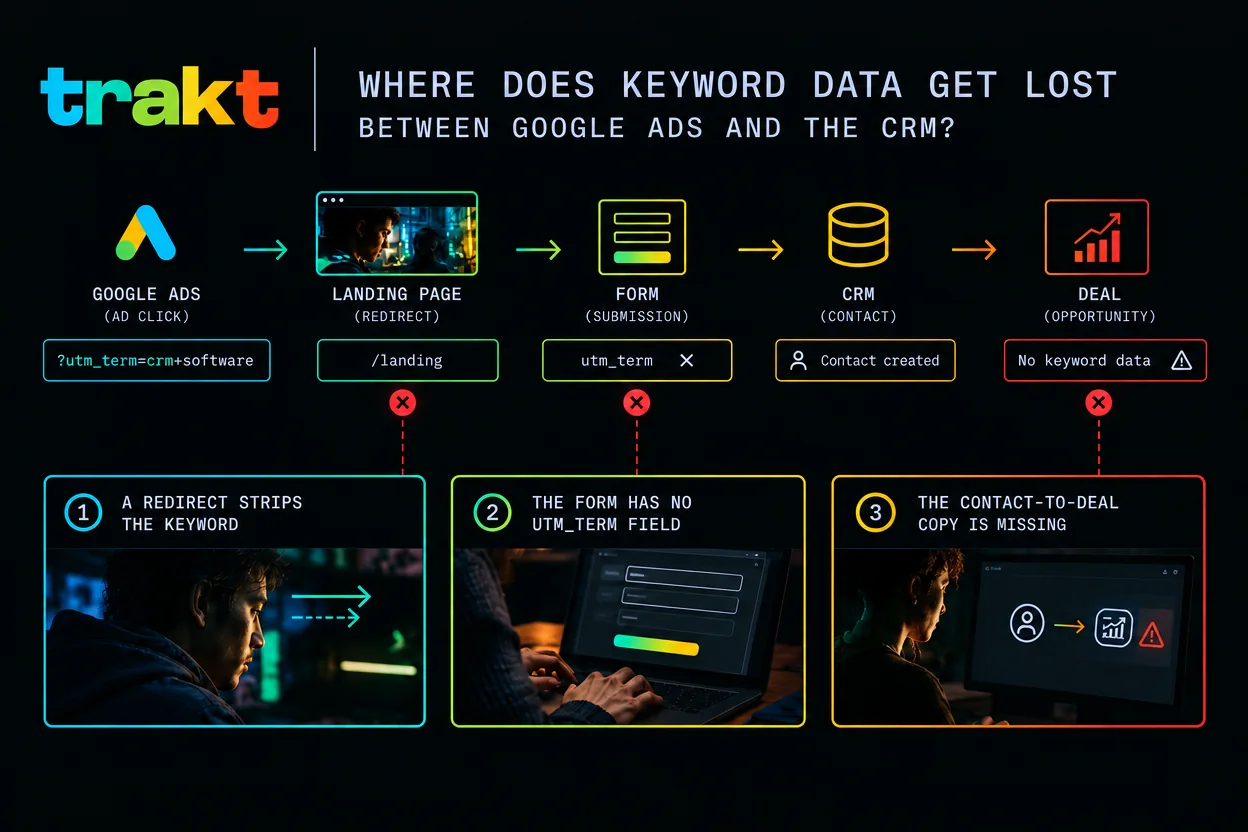
| What you see | Where it broke |
|---|---|
utm_term is missing on the landing page | The template, or a redirect that dropped the query string |
| The keyword is in the URL and missing on the contact | The form has no utm_term field, or the CRM mapping skipped it |
| The keyword is on the contact and missing on the deal | The contact-to-deal copy was never built |
A redirect strips the query string
The ad lands on lp.example.com/offer?utm_term=revenue%20attribution, which redirects to example.com/offer. If that redirect does not pass the query string, the keyword is gone before the form. URL shorteners, page builders that rewrite the URL, and subdomain redirects do this.
The form has no utm_term field
The keyword is in the address bar. The form sends name, email, and company. The CRM says "Google". Nobody can tell which keyword.
The deal never inherits the contact field
This one is quiet. Everything upstream looks healthy. You filter closed-won deals by keyword and the column is empty, because the value stayed on the contact. It is the most common miss.
How do I report revenue by keyword?
With the keyword on the deal, run a closed-won report grouped by that field.
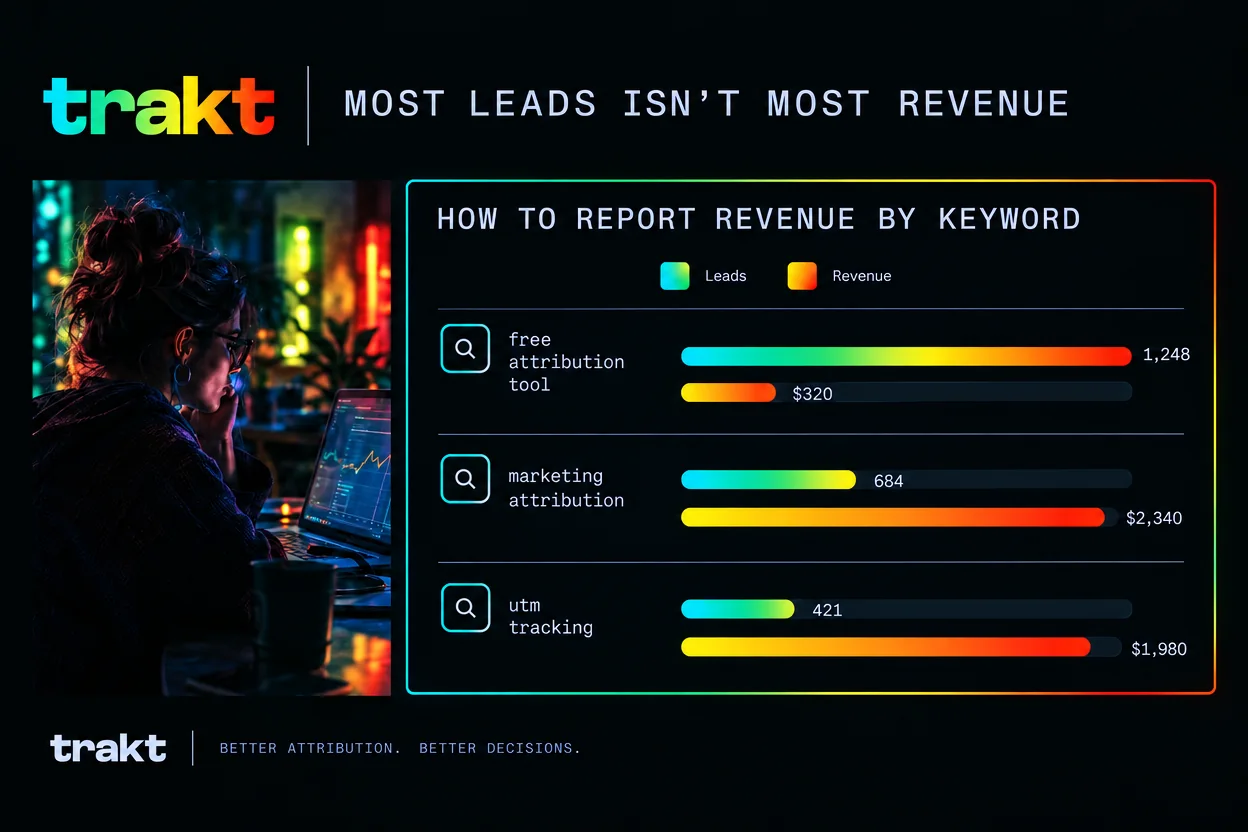
| Keyword | Leads | Revenue |
|---|---|---|
| utm tracking | 4 | $28,000 |
| marketing attribution | 7 | $16,000 |
| free attribution tool | 14 | $2,000 |
Illustrative numbers, not Trakt customer data.
In this example, free attribution tool has the most leads and the least revenue. utm tracking has the fewest leads and the most. A clicks report, or a keyword conversion tracking report, would have ranked the free tool first.
Return on ad spend is revenue divided by ad spend. The ROAS inside Google Ads uses Google's conversion value, so it will not match a report built from closed deals. That mismatch is normal.
Near-duplicate keywords will split the report into a dozen thin rows. Group the ones that mean the same thing when you read it. Keep match type in utm_content, from {matchtype}, instead of treating each match type as a different keyword. Use the search terms report when you need the exact query, and keep that analysis off the revenue report.
Some leads will still arrive with no keyword. Someone clicks, leaves, and comes back by typing your URL. Someone clicks on a phone and books on a laptop. A deal closes months later, so a report that only looks at the last few weeks misses it. Report on closed date, and give it a full sales cycle. For the leads you cannot trace, a plain "How did you hear about us?" on the form covers part of the gap. The goal is a small enough unknown bucket that it cannot swing a budget decision.
There is no keyword-revenue spreadsheet to download. If you want attribution notes when they go out, this is the same email list as the footer.
Product news
Why manual keyword tracking breaks in practice (and how Trakt helps)
The steps above work. They also rot.
- Every form needs the hidden field. A new page, or a rebuilt one, ships without
utm_term. Quietly. - The keyword has to survive the gap between click and submit. Someone who clicks today and fills the form next week needs the value stored somewhere the form can still read.
- The contact-to-deal copy has an owner, until that person leaves. Then it doesn't.
How Trakt closes the gap
Trakt stores the UTMs from the latest tagged visit in a first-party cookie for 90 days. A return visit in the same browser, with no new tags, keeps that keyword. A later ad click that brings its own utm_term replaces it, because the stored value follows the latest tagged visit, not the first one.
When someone submits a form, Trakt records the submission with that stored source attached. The lead keeps its keyword, in utm_term, even when the form has no hidden fields. Won deal value is credited to utm_source on the dashboard. A report that sums revenue by keyword still has to be built in your CRM.
Your own CRM is a separate job. If revenue is reported there, you still need the hidden field and the contact-to-deal copy described above. Trakt does not sync into HubSpot, Salesforce, or Pipedrive, and it does not upload conversions back to Google Ads.
Manual keyword tracking vs. Trakt, by requirement
| Requirement | Manual | Trakt |
|---|---|---|
| Keyword on each submission | A hidden field, added by hand, one form at a time | Recorded with the submission as utm_term. No hidden fields needed |
| Keyword between visits | Your own cookie or script | First-party cookie, 90 days, latest tagged visit |
| Won value on the lead | Entered on the deal in your CRM | Entered deal value, credited to utm_source on the dashboard |
| Keyword revenue report in your own CRM | Same either way. Hidden field, mapped to a property, copied to the deal | Same either way. Hidden field, mapped to a property, copied to the deal |
Where to start
Start with one campaign and one landing page. Prove the keyword reaches the deal before you touch the rest of the account.
- Put
utm_term={keyword}in that campaign's tracking template, with{lpurl}at the front. - Add a hidden
utm_termfield on that landing page's form. - Click your own ad, submit the form, and open the lead.
- Check the keyword on the contact. Then check it on the deal.
The first empty step is the one to fix. Then copy the same template across the account. For how keyword revenue tracking sits next to the rest of the measurement, read the Google Ads tracking playbook.
Frequently asked questions
What is keyword revenue tracking?
Keyword revenue tracking means the Google Ads keyword that matched the click is stored on the closed deal, so you can add up revenue by keyword. Google Ads can show the click, and it can show a conversion you defined. It does not show the deal your team closed later. You get there with utm_term={keyword}, a form field that keeps the value, and a copy from the contact onto the deal.
Why is utm_term blank on Performance Max?
utm_term is blank on Performance Max because those campaigns do not target keywords, so Google's {keyword} parameter comes back empty. Dynamic Search Ads and AI Max keywordless matches do the same. A blank value there means the ad matched without a keyword, not that the template failed. Tell those campaigns apart with utm_campaign or {campaignid}.
How long should I wait before judging keyword revenue?
Wait one full sales cycle before you judge a keyword on closed revenue. The keyword shows up on a new lead straight away, but the deal may not close for months. A report that only looks at the last few weeks misses keywords that started the journey earlier. Use the closed date, and let a full cycle of deals land before you cut a bid.
How do I set up keyword tracking in Google?
Add a tracking template that starts with {lpurl} and includes utm_term={keyword}, then test it. In Google Ads, open Campaigns, then the Settings tab, add the Tracking template column, paste the template, and save. Click one of your own ads and confirm utm_term is filled in on the landing page. A template set on a single keyword overrides the campaign template, so check both if one keyword looks empty.
What is keyword conversion tracking?
Keyword conversion tracking is Google Ads counting a conversion you defined, such as a form submit, against the keyword that got the click. That number lives inside Google Ads, and it is not the revenue on a closed deal. To see the money, keep the same keyword on the CRM deal and report closed-won value by that field. The two reports answer different questions, and they will not match.