
You paid someone to "set up server-side tracking." The invoice says it's done. Your ad platform still reports more conversions than your inbox has leads, and nobody can tell you whether the server part is doing anything at all.
That's what a server-side tracking audit answers. It takes about half an hour, needs a browser and access to your Tag Manager account, and doesn't require you to read a line of server code.
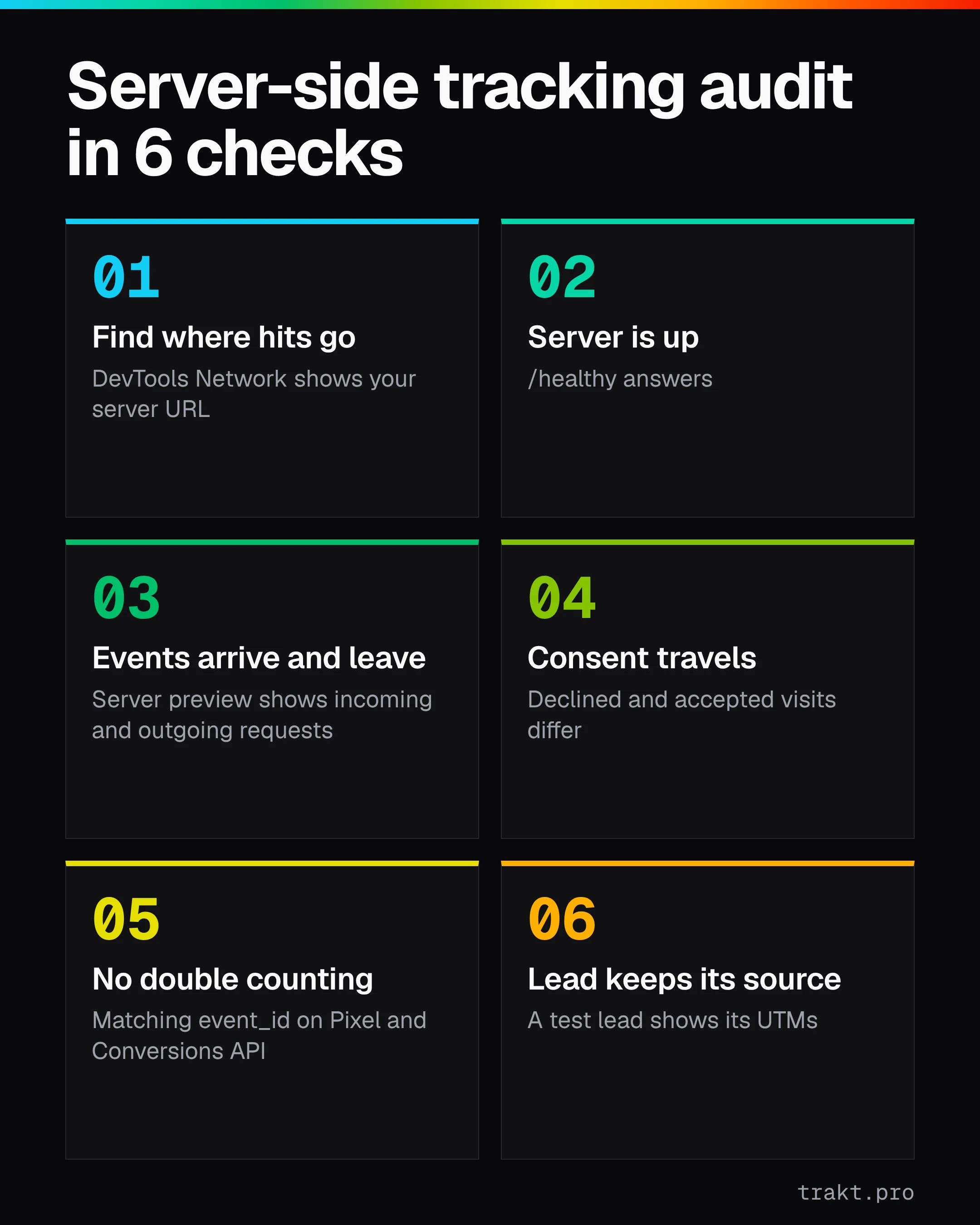
How do you audit server-side tracking?
A server-side tracking audit checks that your browser tags send events to a tagging server you control, that the server is up and forwards them, and that consent, deduplication and each lead's source survive the trip. Most of it needs Chrome DevTools and Tag Manager's preview. Tools like Trakt cover the last check, keeping the campaign on each form submission.
Six checks cover it:
- Find where your browser tags send their data.
- Confirm the tagging server is up.
- Watch real events arrive in the server container.
- Confirm consent choices travel to the server.
- Check that browser and server events don't double count.
- Confirm each lead still carries the campaign that sent it.
The browser tag sends events to your tagging server, the server forwards them to ad platforms and analytics, and the lead record keeps the source.
What server-side tracking is (and what it isn't)
Server-side tracking means your website sends events to a server you run, usually a Google Tag Manager server container on your own subdomain, and that server passes them on to Google Analytics, Google Ads, Meta and the rest. The browser talks to you. You talk to the vendors.
It is not a replacement for the browser. In Google's own setup, a web container (client-side) still collects the event and the consent choice, and the server container receives it. Google's consent mode guide lists both containers as requirements. So when an agency says "we moved you to server-side," the browser half is still there. It just has a new destination.
That's why most audits start in the browser.
Check 1: Find where your browser tags send data
Open your site in Chrome, open Developer Tools, go to the Network tab and reload.
If your setup is client-side only, you'll see requests going straight to google-analytics.com or analytics.google.com. If it's server-side, Google's testing guide says to look for requests sent to your server container URL instead, still carrying parameters like v=2 for Google Analytics hits.
What a pass looks like:
- Requests to something like
metrics.yourdomain.com/g/collect?v=2... - No duplicate set of the same hits going directly to Google at the same time (unless someone intended that)
What a fail looks like: every hit still goes to Google's domains. Then "server-side" exists in a contract, not in your site.
Check 2: Confirm the tagging server is up
A tagging server can be configured perfectly and still be down. Google's Cloud Run setup guide gives a simple health check: take your server container URL, append /healthy to the path, and load it. For example, https://metrics.yourdomain.com/healthy.
If it answers, the server is running. If it times out or errors, every event the browser sends there is going nowhere. Quietly.
Write down the URL and the date. You'll want it the next time someone asks whether tracking was working last month.
Check 3: Watch real events arrive in the server container
This is the check that proves data flows end to end.
In your server container in Tag Manager, click Preview. Then load your site in the same browser. Google's testing guide explains that preview only shows requests from the browser you entered preview mode with, so use one browser for both.
In the preview window:
- The Summary list should show incoming
collect?v=2requests and events such aspage_view. - The Tags tab shows which tags fired for each event.
- The Request tab should list outgoing HTTP requests from the server. No outgoing request means the server received the event and sent it nowhere.
If you see nothing, Google's guide names the two usual causes: the browser tag is pointing at the wrong server URL, or you're testing in a different browser from the preview window.
Do this for the event you actually care about. For most founders that's a form submission or a booked call, not a page view.
Check 4: Confirm consent choices reach the server
Server-side doesn't make consent optional. In Google's design, the consent banner passes the visitor's choices to the Google tag, the tag adds consent parameters to the request it sends to your server, and Google's tags in the server container adjust what they send. Google says you only need to set up consent mode in the web container because of this (consent mode with server-side Tag Manager).
To check it:
- Open your site in a private window and decline cookies.
- Run the server preview again and look at the incoming request for consent parameters.
- Accept cookies and compare.
The two should look different. Under Google's advanced implementation, a declined Google Analytics hit becomes an anonymous, cookieless measurement. Under the basic implementation, the tags don't load at all until consent is given. Neither one is "full data," whatever a vendor deck says.
If declined and accepted visits look identical on the server, stop and get someone to look at your consent setup before anything else. That's a legal question as much as a tracking one, and this article isn't legal advice.
Check 5: Check that browser and server events don't double count
Many setups send the same conversion twice on purpose: once from the browser pixel, once from the server. Meta's Conversions API is the common case. That only works if the platform can tell the two copies are one event.
Meta's deduplication guide is specific: add an event_id to the event from both the Pixel and the Conversions API, and the event_id from the Pixel must match the one in the corresponding server event. The event names have to match too.
How to check without engineering help:
- In Meta Events Manager, open the event and see whether it's received from both the browser and the server.
- In the server preview from Check 3, open the outgoing Meta request and confirm an
event_idis present.
If your Meta conversions are suspiciously close to double your real leads, start here.
Check 6: Confirm each lead still carries the campaign that sent it
Checks 1 to 5 prove your ad platforms get data. They don't prove you do.
Your server container sends events to Google and Meta. Your lead lands in your inbox, a spreadsheet or a CRM, usually through a form, and that path often never touches the tagging server at all. So a server setup can pass every check above while your leads still show up as "Direct."
Run one test lead:
- Visit your site with a tagged URL, for example
?utm_source=audit&utm_medium=test&utm_campaign=server_side_check. - Browse a page or two, then submit your main form.
- Open the lead wherever it lands. Does it show
audit/test/server_side_check?
If it doesn't, the problem is on the browser side: the UTMs weren't kept between pages, or the form dropped them on submit. Both have their own guides: why UTM data gets lost on form submission and why leads show up as Direct.
Server-side tracking audit checklist
| Check | Where you look | Pass looks like |
|---|---|---|
| 1. Where hits go | Chrome DevTools → Network | Requests go to your server container URL |
| 2. Server is up | your-server-url/healthy | The URL answers |
| 3. Events arrive and leave | Server container → Preview | Incoming events and outgoing requests |
| 4. Consent travels | Preview, declined vs accepted | Requests differ by consent state |
| 5. No double counting | Meta Events Manager, outgoing request | Matching event_id on browser and server events |
| 6. Lead keeps its source | Your own lead record | The test UTMs appear on the lead |
If Check 6 is the one that fails, start free with Trakt. It covers that check, not the server side.
Why server-side setups still lose the lead's source (and how Trakt helps)
Server-side tagging solves a vendor problem. It gets events to ad platforms more reliably and gives you control over what leaves your server. It doesn't answer the founder question: which campaign produced this lead, and did that lead turn into money?
How Trakt closes the gap
To be plain about it: Trakt doesn't do server-side tracking. It doesn't run a tagging server, send conversions back to Meta or Google, or deduplicate events. If you need Checks 1 to 5 fixed, that's work in Tag Manager.
What Trakt covers is Check 6. Its snippet keeps the UTMs from a visit in a first-party cookie for 90 days, so a form submitted days later in the same browser still carries them. It records each form submission with its source attached, even when the form has no hidden fields. When you mark a lead won, its deal value is credited to the source captured at submission, in Trakt's leads pipeline.
Trakt also respects Google Consent Mode v2, OneTrust and Cookiebot, and sends nothing without consent. Your consent setup from Check 4 applies to it too.
If you want a quick scan of the tracking on your homepage first, there's a free website attribution audit.
Manual vs. Trakt, by requirement
| Requirement | Manual (Tag Manager and your forms) | Trakt |
|---|---|---|
| Tagging server receives and forwards events | Set up and maintained in Tag Manager | Not covered |
| Browser and server dedup for Meta | event_id set on both sides | Not covered |
| UTMs kept between visits | Custom cookie or storage code | First-party cookie, 90 days |
| Source saved with each form submission | Hidden fields mapped in every form | Recorded with the submission |
| Revenue by source | Spreadsheet joins | Won deal value credited to the captured source |
| Consent | Your banner and consent mode | Same either way: your banner decides |
What to do first
Do Check 6 today. It takes five minutes, needs no Tag Manager access, and tells you whether the thing you actually care about works: the lead knowing where it came from.
- Today, five minutes: send yourself a test lead through a tagged URL and open the record. Source there? Move on. Missing? Fix the form before you spend another dollar on server infrastructure. Why UTM data gets lost on form submission covers the usual causes.
- This week, half an hour: run Checks 1 to 3 in DevTools and server preview. Write down the server URL, the date and what you saw.
- Before the next ad budget change: run Checks 4 and 5. If declined and accepted visits look the same on the server, that goes to whoever owns your consent setup first. Our guide to server-side tracking and consent explains why.
- Every quarter: rerun Check 2 and Check 6. Servers go down and forms get rebuilt without anyone telling you.
FAQ
What is a server side tracking audit?
A server side tracking audit checks whether your website's events really reach a tagging server you control and get forwarded from there. It also checks that consent choices, deduplication and the lead's campaign source survive the trip. You can run the basic version in Chrome DevTools and Tag Manager's server preview in about half an hour.
How do I check if server side tracking is working?
Open Chrome DevTools, go to the Network tab and reload your site. If requests go to your own server container URL rather than straight to google-analytics.com, the browser side is pointed correctly. Then open Preview in your server container and confirm events arrive and outgoing requests leave.
Does server-side tracking get around cookie consent?
No. In Google's setup, consent is collected in the browser and sent to the server with each request, and Google's tags in the server container adjust what they send. When a visitor declines, you get reduced or cookieless measurement at best. Treat consent as a legal question and get advice for your market.
Why do my leads still show as Direct after moving to server-side?
Because server-side tagging feeds ad platforms and analytics, not your lead records. Leads usually arrive through a form, and the form has to keep the UTMs from the visit. If the UTMs aren't stored between pages or the form drops them on submit, the lead arrives with no source, whatever your server does.
Does Trakt do server-side tracking?
No. Trakt runs a client-side snippet that keeps UTMs in a first-party cookie and records each form submission with its source. It doesn't run a tagging server, send conversions to ad platforms or deduplicate events. Use Tag Manager for those and Trakt for knowing which source produced each lead and deal.