What is CRM attribution tracking?
CRM attribution tracking means recording, on each lead and deal in your CRM, the marketing source that produced it: the channel, campaign and link. It usually works by capturing UTM parameters when a form is submitted and storing them in CRM fields, so closed revenue can be grouped by the source that started the deal.
A tagged link reaches the landing page, the form submission carries the source into CRM lead fields, the deal keeps it, and closed revenue is reported by source.
Marketing attribution is a broad term. Most of it happens in ad platforms and analytics tools, which count clicks and sessions. CRM attribution is narrower and more useful to a budget: it is the source on the record that sales actually closes.
When it is missing, the lead source field says Website, Direct or Web form. Why CRM leads show up as direct traffic covers the symptoms.
How do you set up CRM attribution tracking?
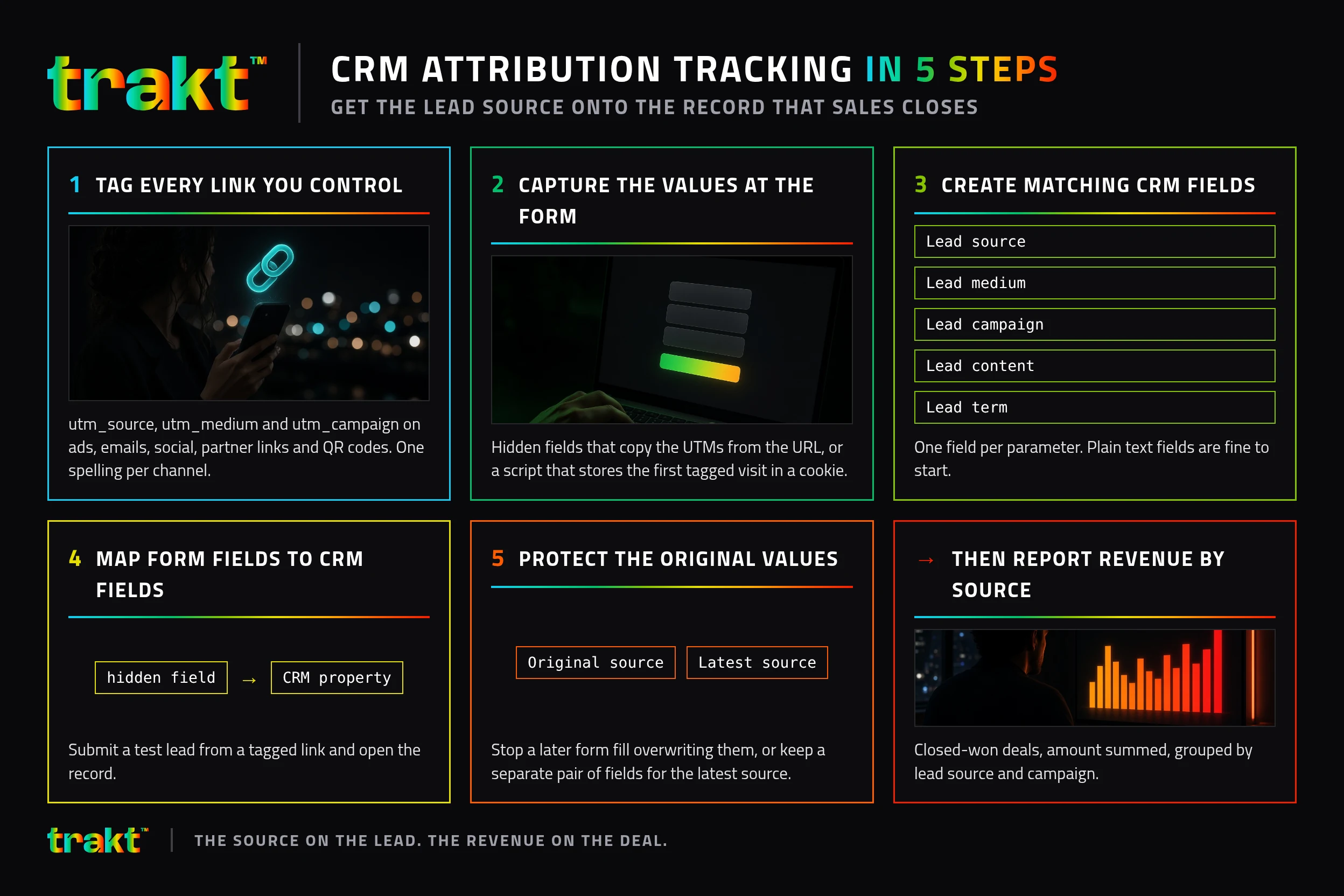
- Tag every link you control. Add
utm_source,utm_mediumandutm_campaignto ads, emails, social posts, partner links and QR codes, with one spelling per channel. A UTM builder keeps names consistent. - Capture the values at the form. Either hidden fields that copy the UTMs from the URL, or a script that stores the first tagged visit in a cookie and adds it to the submission. Without this step the CRM never sees the source.
- Create matching CRM fields. One field per parameter: source, medium, campaign, content and term. Plain text fields are fine to start.
- Map form fields to CRM fields. In your form tool or integration, send each hidden field to its CRM property. Submit a test lead from a tagged link and open the record.
- Protect the original values. Set the fields so a later form fill does not overwrite them, or keep a separate pair of fields for the latest source. Why the CRM lead source gets overwritten explains the usual cause.
If you want each submission recorded with its source without building hidden fields on every form, pre-register for Trakt.
Which fields should a CRM store for attribution?
| CRM field | Filled from | Example value |
|---|---|---|
| Lead source | utm_source | linkedin |
| Lead medium | utm_medium | paid_social |
| Lead campaign | utm_campaign | q4-demo-push |
| Lead content | utm_content | carousel-a |
| Landing page | Page URL at submission | /pricing |
| Referrer | Document referrer | www.google.com |
The values are examples. Copy the structure, not the names. Keep the landing page and referrer even when UTMs are present. They explain leads that arrived untagged.
How do you report revenue by source in a CRM?
Once the fields are on the lead, they have to reach the deal. In most CRMs that means copying the lead's source fields onto the deal or opportunity when it is created, or reporting on the deal through its associated contact.
Then build one report: closed-won deals, amount summed, grouped by lead source and campaign. That is the number to put next to spend.
Illustrative example, made-up numbers, to show which column matters:
| Source (example) | Leads (example) | Closed-won revenue (example) |
|---|---|---|
google / cpc | 40 | $18,000 |
linkedin / paid_social | 12 | $26,000 |
newsletter / email | 25 | $6,000 |
In the example, the channel with the most leads is not the one with the most revenue. Only a CRM that keeps the source can show that.
Common reasons CRM attribution tracking breaks
- The form posts name and email only. The page was tagged. The lead was not. See why UTM data disappears at form submission.
- Redirects drop the query string. Click your own link and read the final URL.
- Two spellings of one source.
LinkedInandlinkedinare two rows. - Sales edits the source by hand. Make the original fields read-only, or log manual changes in a separate field.
- The lead comes back on another device. UTMs live on the URL that was clicked, and cookies belong to one browser.
How Trakt handles CRM attribution tracking
Trakt remembers the UTMs in a first-party cookie for 90 days, so a form submission days later in the same browser still carries them. It records each form submission with its source attached, even when the form has no hidden fields, and can inject hidden fields into your forms. You can build forms in Trakt, or let Trakt find the forms already on your site. Won deal value is credited to the source captured at submission, in Trakt's leads pipeline, and you get a new-lead alert by email and Slack.
| Requirement | Manual setup | Trakt |
|---|---|---|
| Consistent UTM names | A shared sheet and discipline | Builder with a fixed source list |
| Source on the submission | Hidden fields on every form | Recorded with the submission |
| Source kept after the first visit | Custom cookie script | First-party cookie, 90 days |
| Revenue by source | Deal report in your CRM | Won value by source in the pipeline |
| Same either way | Tag links before they go out | Tag links before they go out |
Frequently asked questions
What is CRM attribution tracking?
CRM attribution tracking is storing the marketing source of each lead, such as the UTM source, medium and campaign, on the lead and deal records in your CRM. It lets you report closed revenue by channel and campaign instead of only clicks or form fills.
How do I get UTM parameters into my CRM?
Capture them on the form, then map them to CRM fields. Hidden form fields can copy UTMs from the URL, or a tracking script can store the visit and add it to the submission. Create one CRM property per parameter and map each form field to it. Test with a tagged link before launch.
What is the difference between CRM attribution and marketing attribution?
Marketing attribution is the wider practice of crediting conversions to channels, often inside ad platforms or analytics. CRM attribution puts the source on the record sales closes, so revenue, not just clicks or conversions, can be grouped by source.
Why does my CRM say the lead source is Website or Direct?
Usually because the form did not send any source data, so the CRM fell back to a default. Other causes are redirects that drop UTMs, a returning visitor on another device, or a later form fill overwriting the original source.
Which CRM fields do I need for lead source tracking?
At minimum, source, medium and campaign, filled from the matching UTM parameters. Content, term, landing page and referrer add detail. Keep the original values protected from later overwrites so the first tagged source survives.
Can I track lead attribution without hidden fields?
Yes, if a tool records the submission together with the stored source. Trakt records each form submission with its source attached, even when the form has no hidden fields. To push those values into another CRM's own fields, the form still needs to carry them.